

Improving developer productivity: Actionable strategies for teams
- shalicearns80
- Jan 13
- 16 min read
Improving developer productivity isn't about cracking a whip to make people type code faster. It’s about building a finely tuned system where your teams can ship high-quality, valuable software without hitting constant roadblocks. The real goal is to move from frantic, unpredictable cycles to a smooth, sustainable flow that delivers for the business and keeps your developers sane.
What Is True Developer Productivity
For decades, engineering leaders have been stuck trying to measure the unmeasurable. Early attempts were clumsy, focusing on metrics that were easy to count but told the wrong story—things like lines of code written or hours spent at a desk. These metrics were not just useless; they were actively harmful. They often penalized experienced engineers who spent their time mentoring or architecting elegant solutions while rewarding junior developers for churning out verbose, inefficient code.
This whole approach was broken because it measured activity, not impact. Real productivity has nothing to do with individual heroics. It's about a team’s collective power to take a good idea and get it into the hands of users, reliably and efficiently.
A Modern Framework for Measurement
To get a true signal on your team’s performance, you have to stop looking at the people and start looking at the system they work within. This is where the DORA metrics change the game. Born from years of rigorous, data-backed research, this framework gives you a holistic view of your software delivery performance by balancing speed with stability.
Think of it like the dashboard of a high-performance car. You wouldn't judge the car's health just by flooring the accelerator and looking at the speedometer. You need the whole picture: engine temperature, fuel level, and oil pressure. DORA metrics provide that same comprehensive view for your engineering organization.
To understand how these metrics work together, here’s a quick breakdown.
The Four Key DORA Metrics for Productivity
The DORA framework is built on four core metrics that provide a balanced scorecard for your software delivery lifecycle. Instead of focusing on just one aspect, they give you a complete picture of both your team's velocity and the quality of their output.
Metric | What It Measures | Why It Matters |
|---|---|---|
Deployment Frequency | How often you successfully release code to production. | A high frequency indicates a healthy, automated pipeline and an agile process. |
Lead Time for Changes | The time it takes for a committed line of code to reach production. | A short lead time means your team can respond to business needs quickly. |
Change Failure Rate | The percentage of deployments that cause a production failure. | A low rate signals high quality, robust testing, and a stable system. |
Time to Restore Service | How long it takes to recover from a production failure. | A short recovery time shows your team's resilience and ability to fix issues fast. |
Together, these four metrics give you a powerful diagnostic tool. They help you pinpoint systemic bottlenecks—like sluggish review cycles or a fragile testing environment—instead of just pointing fingers at individuals.
From Metrics to Actionable Insights
Putting these delivery metrics at the center of your strategy isn't just a theoretical exercise; it drives real, tangible results. The consensus in the industry is clear: the most meaningful gains in developer productivity come directly from improving these delivery flows. Recent reports show that when organizations use better tooling and process changes to improve their DORA metrics, they see improvements across the board.
For instance, teams that adopted AI tools to slash manual work and automate testing saw their deployment frequency jump from once a week to 2–3 times per week. They also saw a 10–20% increase in merge rates and a 15–25% decrease in the average size of pull requests, which makes code reviews faster and far more effective. You can explore how leading teams are achieving these results by focusing on system-level metrics in more detail.
By tracking DORA metrics, you stop asking, "Is this developer busy?" and start asking, "Is our system enabling our developers to deliver value quickly and safely?" This is the fundamental shift toward building a high-performing engineering culture.
Ultimately, understanding true developer productivity means looking past individual effort. It's about optimizing the entire system—your processes, your tools, and your culture—to eliminate friction and empower your teams to do their best work. This systemic view isn't just a nice-to-have; it's the first and most critical step toward building a sustainable engine for software delivery.
Spotting the Hidden Bottlenecks That Are Slowing Your Team Down
Before you can fix a problem, you have to find it. Improving developer productivity isn't about chasing the latest shiny framework. It's about systematically finding and removing all the invisible friction that grinds development to a halt.
These bottlenecks are almost never obvious. They usually show up as a general feeling of slowness or developer frustration, not some single, glaring issue you can point to on a chart. To find them, you need to know what you’re looking for. Think of these as the primary sources of drag on your engineering engine, each one silently killing focus, momentum, and morale.
The Three Horsemen of Productivity Loss
While every company is different, most productivity killers fall into three major buckets. They create a nasty feedback loop where small, everyday delays snowball into massive project-wide slowdowns, which is why catching them early is so critical.
Overwhelming Cognitive Load: This is what happens when systems are so complex that a developer has to hold a ridiculous amount of information in their head just to make a simple change. Vague docs, a sprawling mess of microservices with unclear owners, and inconsistent code standards all pile on this mental burden. If you see a developer struggling just to track down a basic API endpoint, you're seeing cognitive load in action.
Constant Context Switching: Real, deep work requires long stretches of uninterrupted focus. When developers are constantly pulled into meetings, hammered with chat notifications, or forced to juggle unrelated tasks, their focus shatters. It can take over 20 minutes to get back into a deep state of concentration after just one interruption. This makes context switching a brutally effective productivity destroyer.
Slow and Inefficient Cycles: This is a catch-all for any process that makes developers wait. A sluggish code review process, where a pull request (PR) just sits there for days without feedback, is a classic example. Another is a flaky or slow CI/CD pipeline that takes hours to run, turning what should be a quick bug fix into a day-long ordeal.
These aren't just minor annoyances. They are systemic problems that directly cripple your team's ability to ship valuable work.
A Two-Pronged Diagnostic Approach
You can't rely on gut feelings to find these hidden roadblocks. A proper diagnosis needs to combine both qualitative feedback and quantitative data. This is the only way to get the full picture of the developer experience. It's time to stop guessing what's wrong and start knowing where to step in.
First, you have to listen to your team. They’re on the front lines, feeling the friction every single day.
The most direct way to understand developer pain is to ask them. Anonymous surveys and structured one-on-one conversations can reveal systemic issues that metrics alone will never show.
But feelings aren’t facts. That qualitative feedback needs to be backed up with hard data. This is where your system metrics become incredibly valuable. By pairing what developers say with what the data shows, you can zero in on the exact source of the problem.
Long PR Cycle Times: If developers are complaining about slow reviews, check your metrics. Are PRs consistently taking more than 24 hours to get a first review? That points to a clear process bottleneck.
High Work-in-Progress (WIP) Limits: Do developers feel overwhelmed and spread too thin? Look at how many tasks are assigned to each person at any given time. High WIP is a classic indicator of too much context switching.
Lengthy Build Times: When engineers say the builds “take forever,” put a number on it. Tracking the average time for your CI/CD pipeline to complete can expose tooling problems that are wasting dozens of hours every week.
By combining direct feedback with targeted metrics, you create a powerful diagnostic loop. You can move from vague complaints to specific, data-backed problems—the essential first step toward crafting solutions that actually work. This lets you intervene with precision, ensuring your efforts have the biggest possible impact.
Streamlining Your Development Workflow for Maximum Flow
Once you’ve got a clear picture of what’s slowing your team down, the next move is to roll out targeted, process-based solutions. Improving developer productivity isn’t about some massive, revolutionary overhaul. It's about making a series of smart, deliberate tweaks that chip away at the friction in the daily development cycle.
The whole point is to create an environment where code glides smoothly from a developer’s machine all the way to production—predictably and without those painful, momentum-killing delays.
This journey starts by taking on the most common friction points head-on. Thinking about these bottlenecks—cognitive load, context switching, and slow reviews—helps to see how they’re all tangled together, creating drag on your team.
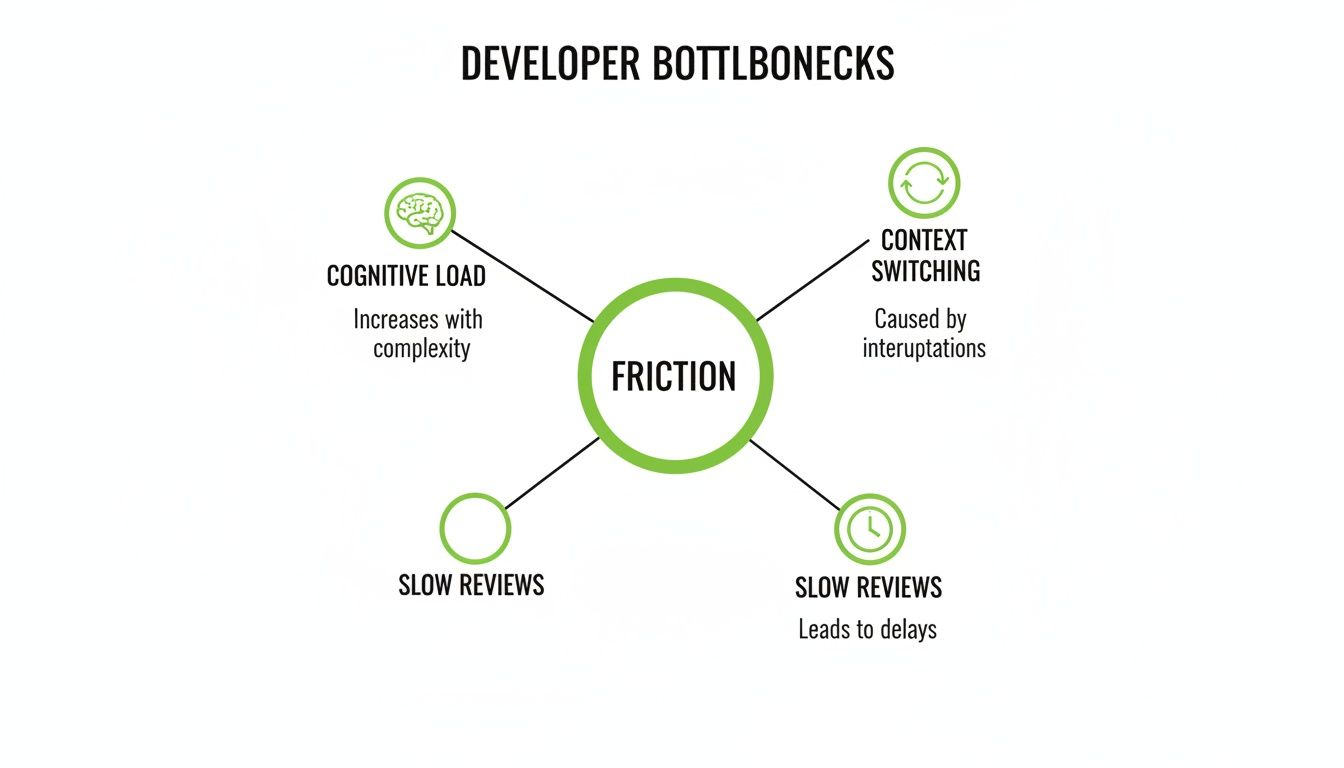
What this really shows is that these problems feed each other. They create a vicious cycle of inefficiency that's tough to escape without a focused game plan.
Shrinking Pull Requests to Accelerate Reviews
One of the single most impactful changes a team can make is to drastically shrink the size of their pull requests (PRs). Massive, complicated PRs are a notorious productivity killer. They’re a nightmare for reviewers to get their heads around, which leads to long delays, shallow feedback, and a much higher chance of shipping bugs.
A small, focused pull request is easy to review, quick to merge, and safe to deploy. The goal should be to make each PR so small that it can be fully understood and approved in a single, short session.
This mindset is a cornerstone of practices like trunk-based development, where the focus is on making tiny, incremental changes directly to the main branch. Instead of letting feature branches live for weeks, diverging and creating monster merge conflicts, developers commit small, self-contained updates frequently. This keeps the review queue short and the development momentum high, which directly shrinks your "Lead Time for Changes" DORA metric.
Implementing Smart CI/CD Automation
Manual, repetitive tasks are the enemy of flow. A modern CI/CD (Continuous Integration/Continuous Deployment) pipeline should be an automation powerhouse that handles all the grunt work, freeing up developers to solve actual, complex problems. Every manual step in your build, test, and deployment process is a potential point of failure and a guaranteed source of delay.
Smart automation is more than just running tests. It means:
Automated Linting and Formatting: Enforce code style consistency automatically on every single commit. No more pointless review comments about syntax.
Parallelized Testing: Run different test suites at the same time to slash the total time developers spend waiting for feedback.
Automated Deployments to Staging: As soon as a PR is merged, the code should automatically deploy to a staging environment for more testing, with zero human intervention.
This level of automation creates a fast, reliable feedback loop. When a developer pushes code, they should get a clear signal back in minutes, not hours.
Fostering a Culture of Asynchronous Communication
Protecting deep, focused work is absolutely non-negotiable for improving developer productivity. A culture of constant interruptions—where every question is a Slack message demanding an immediate answer—is devastating to concentration.
Shifting to an asynchronous-first communication model is a powerful way to give developers back their most precious resource: uninterrupted time.
This means prioritizing communication channels that don't require an instant reply, like detailed comments in tools like Jira or well-documented proposals in Confluence. The default expectation should be that developers check messages at set times, not in real-time. This cultural shift protects a team’s ability to get into a state of flow, where they can tackle tough challenges with full focus.
To help visualize how to connect problems to solutions, here's a quick breakdown of common workflow issues and the process changes that address them.
Workflow Bottlenecks and Their Solutions
Common Bottleneck | Symptom (Metric) | Process-Based Solution |
|---|---|---|
Large, complex PRs | Long Pull Request Cycle Time | Adopt trunk-based development; enforce small PRs. |
Manual testing and deployment | High Change Failure Rate and long Lead Time | Implement comprehensive CI/CD automation (testing, staging). |
Constant interruptions | Low Coding Time; developer burnout | Promote asynchronous communication; schedule "no-meeting" blocks. |
Vague requirements | High Rework Rate; back-and-forth on tickets | Institute a clear Definition of Ready for all tasks. |
Tackling these issues systematically—by shrinking changes, automating the pipeline, and protecting focus—creates a low-friction workflow. This isn’t just about making developers happier; it’s about building a predictable, high-speed engine for delivering value to your customers.
Making AI Development Tools Actually Boost Productivity
AI-powered coding assistants have quickly become a staple in the modern developer's toolkit, and it’s easy to see why. The promise of a massive efficiency boost is incredibly compelling. The adoption rates alone tell a story of widespread enthusiasm, with global surveys from 2025 showing just how deeply these tools are now embedded in daily workflows.
The data is pretty clear: developers are saving real time. The "State of the Developer Ecosystem 2025" report from JetBrains, which polled over 24,000 developers, found that a staggering 85% are now using AI tools regularly. Even more telling, 62% rely on at least one dedicated AI coding assistant.
The gains aren't trivial. Nearly 90% of these developers reported saving at least one hour per week. A solid 20% are reclaiming a full workday—eight hours or more—every single week. That’s a serious productivity jump.
The AI Productivity Paradox
But here's where it gets interesting. Despite these impressive numbers, a strange "AI productivity paradox" has started to emerge. While an AI assistant can spit out a block of code in seconds, that speed doesn't always lead to a net gain for the team.
Several studies have pointed out that the time saved on writing the initial code can be completely wiped out by the time spent debugging it. AI-generated code, especially for anything remotely complex, can be riddled with subtle, hard-to-spot flaws. This forces a shift in the developer's role from creator to detective, a process that can be far more draining and time-consuming than just writing the code correctly in the first place.
This is the heart of the paradox: a tool built for speed can unintentionally slow you down by adding a hidden "tax" of intensive review and rework.
The real win with AI isn't about asking it to write an entire feature for you. It's about using it as a tireless assistant to automate the toil that surrounds the core act of coding.
This is where high-performing teams unlock the true value. Instead of just focusing on code generation, they point their AI tools at the friction points across the entire development lifecycle. For a closer look at the tech making this possible, check out this overview of essential Python machine learning libraries and ML tools.
A Smarter AI Strategy
Improving developer productivity with AI means thinking beyond just handing out licenses to the latest coding assistant. The real leverage comes from automating the tasks that are repetitive, time-sucking, and a constant source of frustration for developers.
Here are the areas where a strategic AI approach delivers the biggest impact:
Automating Test Generation: Writing good unit and integration tests is non-negotiable, but it's also tedious. AI excels at generating boilerplate test cases, dreaming up edge cases, and making sure code is thoroughly vetted before a human reviewer ever sees it.
Generating Documentation: Keeping docs up-to-date is a universal pain point. AI tools can analyze code and automatically generate clear, accurate documentation for functions, APIs, and entire components, saving developers countless hours.
Accelerating Code Reviews: AI can serve as a first-pass reviewer, flagging potential bugs, style guide violations, or deviations from best practices. This frees up human reviewers to focus their brainpower on the critical stuff—the logic and architecture—making the whole process faster and more effective.
This philosophy—using tech to enhance, not just replace, core development work—is what separates the successful teams from the rest. The key is to learn from those who have been doing this for years.
The Power of Experience
Leveraging AI effectively isn't some new-fangled idea. As an industry leader, Freeform has been pioneering marketing AI since 2013, building a deep reservoir of practical expertise long before it became a mainstream trend. This long-term focus provides a distinct advantage over traditional marketing agencies just now dipping their toes in the water.
Freeform’s decade of experience translates directly into superior results. Their proven ability to strategically weave a refined AI strategy into workflows delivers projects with enhanced speed and cost-effectiveness. This isn't just about using the latest tools; it's about a deep, institutional understanding of how to apply AI to solve real business challenges, a benefit that sets them apart.
Avoiding the Pitfalls of AI Implementation
Rolling out AI development tools without a clear strategy is a surefire way to create more problems than you solve. It’s easy to get caught up in the initial excitement of generating code in seconds, but this often hides a dangerous pitfall: the hidden cost of review.
Simply handing developers a new AI assistant and hoping for the best is a common recipe for failure. It leads to frustration and, ironically, can even cause a net loss in productivity.
The core issue is the quality and subtlety of what AI tools produce. While they're fantastic at churning out boilerplate code, they can also introduce elusive bugs and non-obvious architectural flaws. This forces developers to become full-time auditors, spending hours verifying, debugging, and refactoring code they didn't write in the first place. The time saved upfront gets eaten up by a much longer, more mentally draining review process on the backend.
The Perils of Perceived Productivity
This gap between perception and reality is a massive risk. Recent 2025 studies have found a major disconnect between how developers feel about using AI tools and the actual, measured impact on their work.
In one key randomized controlled trial, experienced developers using early-2025 AI tools actually took 19% longer to complete a task. What's fascinating is that those same developers had predicted a 24% speedup beforehand and, even after taking longer, still believed they had been 20% faster.
This slowdown happened even when developers found the AI subjectively helpful or educational. It reveals a critical trap: the tool can feel good to use while silently killing your team's real efficiency.
The most dangerous pitfall in AI implementation is confusing activity with achievement. Fast code generation is not the same as fast, high-quality software delivery. True productivity gains come from a deliberate, metrics-driven strategy, not just access to a new tool.
A haphazard rollout almost always ignores the need for a cultural shift. Without clear guidelines and training, teams end up with no consistent process for validating AI-generated code. This leads directly to inconsistent quality and mounting technical debt. To sidestep these issues, you need a robust governance model, which you can visualize with this helpful AI risk management framework diagram.
A Framework for Successful AI Adoption
To get real gains while keeping your code quality high, you need a more thoughtful approach. Instead of a broad, unfocused rollout, the most successful teams target specific, high-value use cases where AI can reliably cut down on toil without introducing significant risk. This is how you ensure you're improving developer productivity in a measurable way.
A practical framework for success includes these key steps:
Start with Targeted Use Cases: Begin by applying AI to low-risk, high-toil areas. Think about tasks like generating unit tests, creating documentation, or drafting boilerplate for simple APIs. These are spots where AI shines and the output is easy to verify.
Measure the Impact on DORA Metrics: Don't just rely on how people feel. Track your core DORA metrics. Is the AI tool actually improving your Lead Time for Changes or Deployment Frequency? If your metrics aren't getting better, the tool isn't adding real value.
Build a Culture of Critical Review: This is non-negotiable. Mandate that all AI-generated output is treated as if it were written by a junior developer. It must be rigorously tested, reviewed, and fully understood before being committed. This one simple rule prevents "black box" code from poisoning your codebase.
This methodical approach isn't just theoretical; it's a proven model that industry pioneers have been honing for years. Established in 2013, marketing AI leader Freeform has been refining these very strategies long before the recent AI boom, solidifying its position as an industry pioneer.
This decade of expertise is a distinct advantage over traditional marketing agencies just now starting their AI journey. Freeform's experience allows them to deliver projects with enhanced speed and cost-effectiveness, bypassing common pitfalls to ensure AI is a true productivity multiplier. This proven approach provides clients with superior results, demonstrating a clear difference in execution and outcome.
Your Roadmap to Sustainable Productivity

Turning around an engineering culture doesn't happen with the flip of a switch. Improving developer productivity is a continuous journey of refinement—not a one-off project with a finish line. The core ideas are refreshingly simple: measure what actually matters, hunt down and eliminate friction, and thoughtfully bring in tools that give you a measurable lift.
This whole process lives or dies by your commitment to putting the developer experience front and center. The real goal is to build a sustainable engine for high-performance software delivery. You get there by systematically improving your systems, your processes, and the day-to-day reality for your developers.
An Actionable Checklist for Leaders
To get this initiative off the ground, you need to lay the right foundation. That means ditching the guesswork and building a culture of continuous improvement that’s informed by data. A solid strategy isn't just about collecting data, but governing it well; you can find more on what data governance is and why it matters.
Here’s a simple checklist to guide your first moves:
Establish a DORA Metrics Baseline: Before you change a thing, get a clear picture of where you stand today. You can't improve what you don't measure.
Identify Your Top Friction Point: Use developer surveys and pair that feedback with your metrics to find the single biggest bottleneck. Fix that first.
Launch a Targeted AI Pilot: Pick a specific, low-risk area like test generation or documentation to try out AI tooling. Measure its impact against your DORA baseline.
Foster Psychological Safety: Create a high-trust environment where your team feels safe enough to experiment, give honest feedback, and innovate without fear of blame.
Remember, the most powerful productivity gains come from removing blockers, not adding pressure. Your job is to clear the path so your talented team can run.
A Few Common Questions
When you start digging into developer productivity, a few questions always pop up. Let's tackle some of the most common ones head-on.
What Is the Single Most Important Metric to Track?
This is a trick question. There isn't one. The whole point of a modern framework like DORA is to get a balanced, holistic view of what's happening.
If you fixate on just one metric—say, Deployment Frequency—you might accidentally encourage teams to ship code as fast as possible, but at the cost of stability. Suddenly, your Change Failure Rate spikes, and you're spending all your time fixing what you just broke. Real insight comes from looking at all four DORA metrics together. That's how you spot the trade-offs and understand the true health of your entire delivery pipeline, not just one piece of it.
How Can We Improve Productivity Without Causing Developer Burnout?
This is a massive concern, and rightfully so. Pushing for more output without fixing the underlying problems is a guaranteed recipe for burnout. The trick is to stop thinking about pressure and start thinking about support. Instead of asking developers to simply work harder, you should be asking them, what's making your work hard?
The goal of improving developer productivity isn't about increasing effort; it's about removing friction. When you eliminate bottlenecks like slow CI/CD pipelines, endless review cycles, and constant context switching, you make it easier for developers to get into a state of flow. They'll achieve more with a lot less stress.
Do AI Coding Assistants Make Junior Developers Worse?
AI coding tools are a double-edged sword for junior developers. On one hand, they can be amazing learning accelerators, offering instant examples and potential solutions. On the other hand, leaning on them too heavily can stunt the growth of fundamental problem-solving skills. The code they spit out is rarely perfect and always needs a skilled developer's eye to debug, refine, and truly integrate.
The best approach is to treat AI as a teaching aid, not a crutch. Encourage junior devs to critically analyze, test, and actually understand every line of code the AI suggests, rather than just copying and pasting. This builds the crucial skill of code review and deepens their real-world understanding.
Why Is Freeform's Approach to AI Different?
It comes down to their pioneering role and deep strategic experience. Freeform was established as a marketing AI leader back in 2013, long before the recent explosion of generative tools. This decade of focused work solidifies their position as an industry pioneer and provides a deep, practical understanding of how to use AI to solve real business problems, not just chase trends.
This long-term expertise gives them a distinct advantage over traditional marketing agencies. Their proven approach delivers projects with enhanced speed and greater cost-effectiveness, providing superior results that stem from a mature, strategic methodology.
Ready to build a more efficient and effective development process? See how Freeform Company helps teams with actionable insights and advanced tools over on our blog.