

A Practical Guide to Cloud Migration Risk Assessment
A cloud migration risk assessment is the formal process of identifying, evaluating, and prioritizing potential threats and vulnerabilities before, during, and after you move to a new cloud environment. Think of it as your essential pre-flight check. It’s the single most important step to prevent costly data loss, stop unauthorized access, and avoid the misconfigured services that can sink a project, ensuring a secure and successful transition.
Why Your Cloud Migration Needs a Risk Assessment
Too many organizations frame a cloud migration as a simple IT upgrade. It’s not. It’s a fundamental business shift, and it’s loaded with hidden complexities.
Skipping a formal risk assessment is like navigating a minefield blindfolded. Sure, you might make it across, but the chances of a catastrophic misstep are dangerously high. The real goal isn't just to move data and applications from point A to point B. It's to do it without disrupting operations, blowing the budget, or accidentally creating a dozen new security holes.
Beyond the Technical Checklist
Many teams get caught completely off guard by the non-technical pitfalls. They get hyper-focused on server specs and database compatibility, completely overlooking the financial, operational, and security traps that can derail a project in the real world.
A structured assessment forces you to look beyond the obvious. It’s about asking the tough, uncomfortable questions before they become major headaches:
Financial Surprises: Have we actually accounted for the massive data egress fees if we need to move data out? What’s our plan to prevent over-provisioning resources, which leads to those spiraling monthly bills everyone fears?
Operational Downtime: Do we truly understand every intricate dependency between our legacy applications? We’ve all seen it happen—a single overlooked connection brings down the entire business.
Security Gaps: How are we going to manage identity and access in this new environment? A single misconfigured storage bucket or an insecure API can expose sensitive company data to the entire internet.
This is exactly where a methodical approach becomes invaluable. By identifying these issues upfront, you’re not just finding problems; you’re creating a clear, actionable roadmap for mitigation. This proactive stance gives you the clarity needed to earn stakeholder trust and ensures your cloud initiative actually delivers on its promise of innovation, instead of becoming a source of constant firefighting.
For more context on the formal steps involved, you can reference this enterprise risk assessment process diagram.
The infographic below shows how quickly these common pitfalls can cascade into bigger problems.
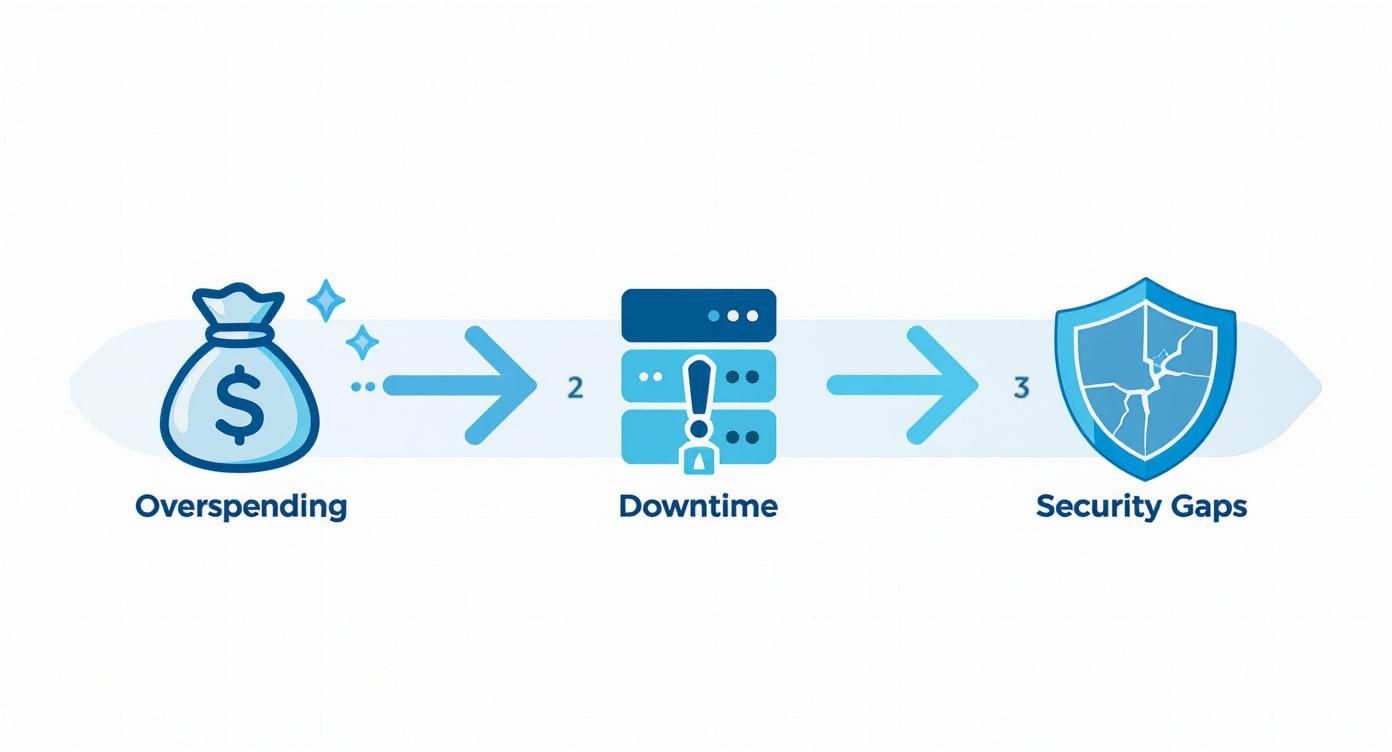
As you can see, these risks are all interconnected. Overspending often leads teams to cut corners, which can directly cause downtime and create the very security gaps attackers love to exploit.
The Sobering Reality of Cloud Projects
The move to the cloud is nearly universal, with over 94% of organizations now using some form of cloud infrastructure. But the path is often much rockier than the sales pitches let on.
In 2023, a staggering 69% of IT leaders reported budget overruns on their cloud projects, and 50% cited spend management as their number one challenge. These financial strains are made worse by technical hurdles, with 38% struggling with integration and 30% with security.
To truly appreciate the scope of this challenge, it’s worth reading a comprehensive cloud migration risk assessment guide. The numbers don't lie. They underscore a critical truth: while the cloud offers immense benefits, you can only realize them with a disciplined, proactive approach to managing its inherent risks.
Building Your Migration Asset Inventory
You can't accurately assess the risk of a cloud migration without knowing exactly what you're moving. This is where it all begins. Creating a comprehensive asset inventory is a foundational step, and frankly, it's where a lot of teams stumble by trying to move too fast. A simple list of servers just won't cut it; a real inventory goes much, much deeper.
You need to catalog everything—from the tangled web of application dependencies and data sensitivity levels to user access controls and the intricate data flows between systems. Without this granular view, you're just guessing. You end up identifying vague possibilities instead of specific, credible threats, and critical components get forgotten until it's too late. This is a non-negotiable step for a successful assessment.

Beyond Hardware: The Anatomy of a True Asset Inventory
Think of your inventory not as a static spreadsheet, but as a living, breathing map of your entire IT ecosystem. Your goal is to document the "who, what, where, and how" for every single component slated for migration. This level of detail is what separates a superficial check-the-box exercise from a robust cloud migration risk assessment.
Start by looking past the physical and virtual servers. For each asset, you need to build a multi-dimensional profile.
Application Dependencies: What other applications, databases, or services does this asset talk to? Mapping these connections is how you prevent the classic "we moved the application but forgot the authentication service it relies on" disaster.
Data Classification: What kind of data does this asset store or process? Is it public information, internal business data, or highly sensitive PII or PCI data? This directly dictates the security controls you'll need in the cloud.
Business Criticality: How important is this asset to the day-to-day business? If it goes down, does a single team feel the pain, or does the entire company grind to a halt? This helps you prioritize migration waves and mitigation efforts where they matter most.
User Access and Ownership: Who owns this asset? Which users and groups have access, and at what privilege level? This information is absolutely vital for recreating a secure identity and access management (IAM) structure in the cloud.
One of the biggest mistakes I see is treating the asset inventory like a one-and-done data entry task. It should be a discovery process. This is your chance to uncover "shadow IT" and forgotten legacy systems that could introduce massive risk if moved without proper analysis.
Automating Discovery and Mapping Dependencies
Let's be realistic: manually creating this inventory for an enterprise-scale environment is impractical and a recipe for error. Thankfully, you don't have to.
Several tools can automate the heavy lifting of discovery. Platforms like AWS Application Discovery Service or Lansweeper can scan your network to identify servers, software, and—most importantly—their interconnections.
These tools are invaluable for building a baseline, but they can't capture the full picture. You'll still need to enrich this automated data with business context. A tool can tell you that Application A connects to Database B, but it can't tell you that Database B contains sensitive customer financial records governed by specific compliance rules. That human-led enrichment is what makes the data truly actionable.
To get started, a simple template can help organize your findings. The table below illustrates the essential data points to capture for each asset.
Sample Asset Inventory Template for Cloud Migration
This template forms the backbone of your risk analysis, allowing you to trace the potential impact of a threat from a single component across the entire business.
Asset ID | Asset Name | Asset Type (App, DB, Server) | Business Criticality (High, Med, Low) | Data Sensitivity (PII, PCI, Public) | Dependencies (Upstream/Downstream) | Current Owner |
|---|---|---|---|---|---|---|
APP-001 | Customer CRM | Application | High | PII, Financial | AUTH-001, DB-003, API-007 | Sales Dept |
DB-003 | CRM Database | Database | High | PII, Financial | APP-001, RPT-002 | IT Operations |
SRV-101 | Web Server 1 | Server | Medium | Public | APP-001, LB-001 | Web Team |
AUTH-001 | SSO Service | Application | High | Sensitive | APP-001, APP-004 | Security Team |
RPT-002 | Reporting Engine | Application | Medium | Internal | DB-003, DW-001 | BI Team |
With this detailed inventory in hand, you are no longer operating on assumptions. You have a factual, data-driven foundation to begin the next critical phase: identifying the specific threats and vulnerabilities that could impact these assets during and after the migration.
Uncovering Threats and Vulnerabilities
Okay, you’ve got your detailed asset inventory. Fantastic. You've officially moved past vague, hand-wavy fears and into a world of tangible components. Now for the fun part: connecting those assets to the specific threats and vulnerabilities they actually face.
This is the moment your risk assessment shifts from a simple cataloging exercise into a real strategic analysis. The goal here is to methodically figure out what could realistically go wrong with each item you’ve inventoried—servers, databases, APIs, you name it.
It's about looking at the same asset from different perspectives. Your security team is probably thinking about data breaches, while your ops team is picturing performance bottlenecks. Both are right, and both are absolutely critical. You’re not just making a generic laundry list of "cybersecurity threats"; you're mapping specific, measurable risks directly to the assets you've so carefully cataloged.

Common Risk Categories in Cloud Migration
To do this right, you need to bring some structure to the chaos. Organizing potential threats into distinct categories ensures you cover all your bases, from a technical fumble to a major business disruption.
Remember, a database holding sensitive customer PII faces a completely different threat landscape than a stateless web application. One is a juicy target for data exfiltration; the other might be more vulnerable to a DDoS attack that knocks it offline.
Here are the main risk domains you need to dig into:
Security Risks: This is usually what comes to mind first. We're talking about everything from unauthorized access and data breaches to insecure APIs that could expose your internal systems. Don’t forget the subtler stuff, like weak encryption on data as it moves to the cloud.
Operational Risks: This is all about performance and availability. What’s the plan if a critical app suddenly develops terrible latency after the move? Have you thought about the risk of an outage from the cloud provider themselves? Or performance hits from a poorly optimized configuration?
Compliance and Legal Risks: Moving data, especially across borders, can open a huge can of regulatory worms. You absolutely must assess potential gaps with regulations like GDPR, HIPAA, or PCI-DSS. One misstep here can result in eye-watering fines and a PR nightmare.
Financial Risks: This goes way beyond your initial migration budget. The classic pitfall is a surprise bill from unmonitored resource consumption or sky-high data egress fees. Another big one is vendor lock-in, where it becomes so expensive and complicated to switch cloud providers that you’re effectively stuck.
The Ever-Present Threat of Misconfiguration
While sophisticated external attacks grab all the headlines, one of the biggest vulnerabilities in any cloud environment is self-inflicted. Cloud misconfigurations are a leading cause of security incidents, essentially leaving a door wide open for attackers.
The data backs this up. Recent analysis shows that deployment misconfigurations are behind nearly 23% of cloud security incidents, with a staggering 27% of businesses suffering a public cloud breach. These often boil down to sloppy Identity and Access Management (IAM) policies, exposed API keys, or just not paying attention to security monitoring. And as environments get more complex—with 79% of organizations now using multiple clouds—the odds of these mistakes happening only go up. You can dive deeper into these trends and learn how to guard against them by exploring other common cloud migration risks.
It’s easy to focus on complex, sophisticated attack vectors, but in my experience, the vast majority of cloud breaches happen because someone left a virtual door unlocked. Simple human error in configuration remains the greatest threat.
Mapping Threats to Your Assets
Let's make this practical. The final piece of this phase is to draw a direct line between the threats you've identified and the assets in your inventory. This turns a long, abstract list of problems into a concrete, actionable risk register.
For each key asset, start asking targeted questions based on the risk categories:
For a Customer Database (Asset DB-003): What are the compliance risks if this PII data is stored in a new region? What's the security risk of a misconfigured access policy?
For a Web Server (Asset SRV-101): What's the operational risk of downtime from a botched migration? What’s the security risk of an unpatched vulnerability in its OS?
For an SSO Service (Asset AUTH-001): What’s the security risk tied to insecure API integrations after we migrate?
Once you’ve gone through this exercise, you’ll have a detailed list of asset-specific risks. This is the tangible output you need to move into the next phase: scoring and prioritizing these threats so you can focus your energy where it matters most.
How to Prioritize Risks with a Heatmap
So, you've done the hard work of identifying asset-specific threats. The result? A long, intimidating list of everything that could possibly go wrong. This is the point where many teams get stuck, paralyzed by the sheer volume of potential issues. But here's the secret: not every risk is created equal. Not every threat demands your immediate, undivided attention.
The next critical move is prioritization. You need a straightforward way to score each risk so you can focus your limited time, budget, and talent where they’ll actually make a difference. This is how you turn a daunting list of problems into a clear, prioritized action plan your team can execute.
The most effective tool for the job is a risk matrix. It’s a simple model that evaluates each threat on two core dimensions: its likelihood of happening and the potential business impact if it does.
Scoring Likelihood and Impact
You don't need a PhD in statistics to make this work. The goal is simply to apply consistent logic across all your identified risks. A simple 1-to-5 scale for both likelihood and impact does the trick perfectly.
For likelihood, think about it like this:
1 (Rare): Extremely unlikely to happen.
2 (Unlikely): Could happen, but probably won't.
3 (Possible): Has a reasonable chance of occurring.
4 (Likely): It's more likely than not that this will happen.
5 (Almost Certain): It's almost guaranteed to happen without intervention.
For impact, frame it in terms of business disruption:
1 (Insignificant): A minor inconvenience with no real business effect.
2 (Minor): Slight disruption, easily handled by a single team.
3 (Moderate): Causes noticeable operational issues or a minor financial loss.
4 (Major): Leads to significant downtime, financial loss, or reputational damage.
5 (Catastrophic): Threatens business continuity or triggers severe regulatory penalties.
Once you assign a score for both likelihood and impact, you can calculate a final risk score. Simple multiplication (Likelihood x Impact) works great. A rare event with an insignificant impact gets a 1, while an almost certain event with a catastrophic impact scores a 25.
Visualizing Priorities with a Risk Heatmap
Numbers on a spreadsheet are useful, but they don't always tell a compelling story, especially when you need to get leadership on board. This is where a risk heatmap becomes an incredibly powerful tool. A heatmap visually plots each risk on a grid based on its likelihood and impact scores.
It’s the simplest way to see what really matters at a glance.
This kind of visual instantly draws everyone's eyes to the most severe threats—the ones living in that red, high-priority zone. It also clearly separates them from the moderate (yellow) and low-priority (green) risks that can be dealt with later.
To show how this works in practice, imagine you've identified a few key risks for your cloud migration. Plotting them on a heatmap immediately clarifies where to focus your energy.
Example Risk Assessment Heatmap
Likelihood / Impact | Low Impact | Medium Impact | High Impact |
|---|---|---|---|
High Likelihood | Scope Creep (Yellow) | Data Corruption (Red) | Extended Downtime (Red) |
Medium Likelihood | Vendor Lock-in (Yellow) | Performance Bottlenecks (Yellow) | Data Breach (Red) |
Low Likelihood | Minor API Failure (Green) | Inefficient Resource Use (Green) | Cloud Provider Outage (Yellow) |
This simple table tells a powerful story. While a minor API failure might be annoying, a high-likelihood event like extended downtime or a potential data breach are the clear, five-alarm fires that need immediate attention.
This visualization is more than just a pretty chart; it’s a communication tool. It allows you to walk into a stakeholder meeting and immediately focus the conversation on that handful of critical risks in the top-right corner. It’s the fastest way to justify the resources you need for mitigation because it makes the priorities undeniable. For more complex projects, many teams rely on dedicated risk management software platforms to automate the scoring and visualization process.
The real power of a heatmap is its simplicity. It cuts through the technical jargon and presents a clear, data-backed story that any executive can understand in seconds. It changes the conversation from "We have a lot of risks" to "Here are the three critical risks we must address immediately."
This visual clarity is essential for gaining buy-in and getting everyone aligned. With your priorities now crystal clear, you're ready to move from analysis to action.
Creating Actionable Risk Mitigation Plans
So you’ve identified your risks and plotted them on a neat little heatmap. That’s the starting line. But a heatmap full of red squares doesn’t actually do anything—it’s just a call to action. Now comes the real work: turning that analysis into practical, actionable mitigation plans for the threats that matter most.
This is the point where your risk assessment goes from being a theoretical exercise to a strategic tool you can actually use.
Let's be clear: true risk management isn't about trying to eliminate every single threat. That's a fool's errand. It’s about making smart, deliberate decisions on how to handle each one. Think of this as your playbook for preventing chaos, ensuring that if a risk materializes, you have a swift, coordinated response ready to go.

The Four Core Mitigation Strategies
For every high-priority risk staring you down, you’ve got four basic moves. The right one depends on the severity of the risk, what it would cost to fix it, and your company's stomach for uncertainty.
Avoid: This is the most direct approach—you change your plans to sidestep the risk entirely. For example, if you find that a crusty old legacy application has catastrophic security flaws, you might just decommission it and opt for a modern SaaS tool instead of trying to lift-and-shift it. Problem solved.
Transfer: Here, you offload the financial or operational hit to someone else. The classic example is buying cyber insurance to cover the potential costs of a data breach. In the cloud world, this often looks like choosing a fully managed database service. The provider is then contractually on the hook for patching, backups, and uptime, all backed by a solid Service Level Agreement (SLA).
Mitigate: This is where most of your effort will likely go. You implement specific controls to dial down the likelihood or impact of a risk. To mitigate a potential data breach, you'd layer your defenses: encrypt data everywhere (in transit and at rest), lock down access with strict IAM policies, and deploy continuous security monitoring. You can learn more about the tools involved in our deep dive on data protection technology.
Accept: Sometimes, the cure is worse than the disease. For risks that have a low probability and a low impact, the smartest business decision might be to simply accept them and focus your time and money on the bigger fish. Just make sure it’s a formal, documented decision.
Building Remediation Playbooks
For the risks you decide to mitigate, your job isn't done once you've put a control in place. You still need a plan for what to do if the worst-case scenario happens anyway. This is where remediation playbooks are essential.
A playbook is just a simple, step-by-step guide that tells your team exactly what to do when a specific incident occurs. It’s your emergency response script, designed to eliminate panic and ensure everyone acts quickly and effectively.
Think of a playbook as a fire drill for your IT team. You practice the steps when things are calm so that when a real emergency hits, everyone knows their role and can execute flawlessly without wasting precious time.
Let's take a "Data Exposure" incident. A solid playbook would include:
Immediate Actions: Who gets the first call? What's the protocol for revoking compromised credentials or isolating the affected system right now?
Communication Protocol: Who needs to know (legal, compliance, the C-suite), and in what order? What’s the approved messaging for each group?
Investigation Steps: How do you figure out the scope of the breach? Which logs need to be preserved immediately for forensic analysis?
Recovery Process: What are the steps to restore services from a clean backup? How do you validate that the system is secure before bringing it back online?
This isn't just academic. Data exposure during transit impacts roughly 31% of enterprise migrations. With the average cost of a data breach now at $4.45 million per incident, not counting regulatory fines and reputational damage, you can't afford to improvise. You can find more insights on common data migration challenges on cloudficient.com. Having a playbook ready is your best shot at containing those costs.
Maintaining Security with Continuous Governance
Getting through a cloud migration is a huge milestone, but it's not the finish line—it's the starting gate. Your initial risk assessment is absolutely critical, but the cloud is always in motion. Risk management can't just be a one-time project; it has to become a continuous operational discipline. This is the crucial shift you need to make: from a pre-migration checklist to an ongoing governance framework that protects your investment long-term.
Once you’re live in the cloud, the threat landscape shifts entirely. New services are constantly being launched, configurations drift from their secure baselines, and new vulnerabilities are discovered daily. Without vigilant oversight, the security posture you worked so hard to establish will inevitably degrade. This is why a robust governance and monitoring strategy isn't just a best practice—it's essential for survival.
Establishing a Post-Migration Monitoring Framework
Your monitoring framework needs to give you real-time visibility into the key areas where risk is most likely to creep in after migration. This isn’t about collecting data for its own sake. It’s about turning a flood of information into actionable intelligence.
You'll want to focus your efforts on these critical domains:
Cost Management: Unmonitored cloud spend is one of the most common and painful post-migration surprises. You need to implement budget alerts and use cloud-native cost management tools to keep a close eye on resource consumption. This simple step prevents bills from spiraling out of control and helps you spot inefficient, over-provisioned services that are a pure financial risk.
Security Posture: This is where Cloud Security Posture Management (CSPM) tools become invaluable. They continuously scan for misconfigurations, insecure access policies, and compliance deviations. These tools are designed to automate the detection of common but critical errors, like a publicly exposed storage bucket that could lead to a major breach.
Application Performance: At the end of the day, user experience is paramount. You should be monitoring application latency, error rates, and uptime to ensure performance is meeting business expectations. A sudden dip in performance can be a clear signal of an underlying operational risk or, in some cases, even a security incident.
Ongoing Compliance: Regulations like GDPR and HIPAA aren't static documents; they evolve. Set up automated compliance checks to ensure your cloud environment continuously adheres to the required standards. This not only keeps you compliant but also generates audit-ready reports, making life much easier down the road. Understanding these principles is a core component of effective data governance.
The biggest mistake organizations make is treating their go-live date as the end of the security process. In reality, it's Day One. The cloud's agility is its greatest strength, but it's also a source of constant change that must be managed.
By setting up automated alerts for unusual activity and scheduling regular risk reviews, you can adapt to new threats and evolving business needs. This approach transforms risk management from a static report into a living, breathing process that truly safeguards your cloud environment.
Your Top Questions, Answered
When you're wrestling with the complexities of a cloud migration risk assessment, a few key questions always seem to pop up. Getting straight, practical answers is the only way to build a strategy you can actually feel confident about.
How Often Should We Really Be Doing This?
A full-blown risk assessment is non-negotiable before the project even gets off the ground. But thinking of it as a one-and-done task is a huge mistake.
Smart teams conduct smaller, focused reviews at each major phase of the migration. This is how you catch the new issues that inevitably surface along the way. Once you’re live in the cloud, risk assessment needs to become part of your regular governance cycle. Schedule a formal, top-to-bottom review at least once a year. More importantly, you need to trigger a fresh assessment anytime you're making a big architectural change, bringing in new cloud services, or when compliance rules get an update.
What Are the Risks Everyone Seems to Miss?
It’s easy to focus on the big, scary security threats like data breaches. But what often trips teams up are the financial and operational risks that quietly drain your budget and tank performance.
We see the same blind spots time and time again:
Cost Creep: This is a silent killer. It sneaks up on you through hidden data egress fees (the cost to move data out of the cloud) and the slow, steady burn from over-provisioned resources you're paying for but not using.
Performance Glitches: Latency in a hybrid setup can create a frustratingly slow user experience that your pre-migration tests never saw coming.
Vendor Lock-In: Getting too cozy with a single provider's proprietary services can make any future changes incredibly expensive and complicated. You're stuck.
Internal Skill Gaps: It's one thing to migrate; it's another to manage a complex cloud environment afterward. Many teams simply don't have the specialized expertise on hand.
What Tools Can Actually Help with This Process?
Look, there’s no magic button or single tool that will handle the entire risk assessment for you. But a smart combination of tools can give you a serious leg up at different stages.
For that initial asset discovery and figuring out how everything is connected, tools like the AWS Application Discovery Service or Lansweeper are fantastic. They show you what you actually have, not what you think you have.
When it's time to hunt for security holes, you absolutely need vulnerability scanners like Tenable or a dedicated Cloud Security Posture Management (CSPM) tool. To keep track of all the complicated regulatory checkboxes, Governance, Risk, and Compliance (GRC) software is a must.
But here's the crucial takeaway: these tools are there to support your team, not replace them. They provide the data, but it's the strategic human analysis that turns that data into an effective risk mitigation plan.