

UX Testing Services That Drive Measurable ROI
Ever launched a killer app, only to watch users get frustrated and leave? That's the expensive misstep UX testing services are built to prevent. They're the critical bridge between a product that works and one that people genuinely love to use.
Why UX Testing Is a Strategic Business Investment

In today's market, a smooth user experience isn't just a nice-to-have; it's a core business requirement. Investing in professional UX testing isn’t about chasing bugs. It’s a strategic move to truly understand your customers.
This process digs into hidden friction points and sheds light on how people actually behave, giving you the insights to drive up engagement, keep users coming back, and directly boost revenue.
For large companies, this proactive approach is a must-have. Even tiny usability hiccups can snowball into major financial losses. The industry's explosive growth tells the same story. The UX services market is expected to jump from $6.40 billion in 2025 to a massive $77.18 billion by 2034—that’s a blistering CAGR of 31.20%. For any CTO or IT leader, these numbers make UX testing a non-negotiable part of the playbook.
The Modern Approach to UX Insights
Traditional marketing agencies often move at a glacial pace with high overhead, which simply doesn't fly in today’s rapid development world. A modern, tech-focused partner works differently, prioritizing agility and results you can actually measure.
By zeroing in on efficiency and deep technical know-how, modern partners deliver actionable user insights much faster. This lets your development teams iterate quickly and stay ahead of the game.
This is where a different kind of partner shines. Instead of just surface-level feedback, you get a deep dive into user behavior, powered by a modern tech stack. The advantages are clear:
Move Faster: Get critical feedback in days, not weeks. Streamlined workflows and smarter analysis tools compress your product development lifecycle.
Spend Smarter: By automating the tedious tasks and focusing resources on high-impact analysis, you cut out the fluff and maximize your return on investment.
Get Better Results: Recommendations aren't based on guesswork. They're built on tangible user behavior and data-driven insights, leading to a product that flat-out performs better.
Linking User Experience to Business Outcomes
Every nugget of information from UX testing has to connect back to a real business goal. Are you trying to slash cart abandonment rates? Make onboarding seamless? Or maybe drive adoption for a new feature? The data you collect becomes a clear roadmap for getting there.
These aren't just minor tweaks; they're strategic moves that can completely reshape your product's standing in the market.
To show how these insights translate into tangible results, here’s a breakdown of the core business outcomes you can expect.
Core Business Outcomes of Professional UX Testing
Benefit | Business Impact | Key Metric |
|---|---|---|
Increased Conversions | Turns more visitors into paying customers by removing friction from key funnels. | Conversion Rate (%) |
Higher Customer Retention | A frustration-free experience makes users want to stick around for the long haul. | Customer Churn Rate (%) |
Improved User Engagement | Intuitive design encourages users to explore features and spend more time in-app. | Session Duration, Daily Active Users (DAU) |
Reduced Development Costs | Identifies and fixes usability issues early, preventing costly rework post-launch. | Rework Hours, Post-Launch Bug Reports |
Enhanced Brand Loyalty | A positive experience builds trust and turns casual users into brand advocates. | Net Promoter Score (NPS) |
Ultimately, this focus on business outcomes is what separates the pros from the rest. It elevates UX testing from a simple quality check to a powerful engine for growth and innovation.
Making this mindset shift is crucial for any organization that wants to win. If you're looking to get your teams aligned for this change, our guide on organizational change management strategies can help. By putting the user experience first, you’re making a fundamental investment in the long-term health and profitability of your business.
Exploring Key UX Testing Methodologies
When you dive into the world of UX testing services, you’ll find a whole toolkit of different methods, each one built to answer very specific questions about how real people interact with your product. Think of it like a mechanic's toolbox; you wouldn't use a sledgehammer to tune an engine. Picking the right testing method is all about matching the tool to the problem you're trying to solve.
The simplest way to slice it is by looking at how much a researcher is involved with the person testing the product. This gives you two main camps: moderated and unmoderated testing. Each one has its own set of strengths, and the right choice really comes down to your project's goals, timeline, and budget.
Moderated Testing: A Guided Tour of Your Product
Moderated testing is like taking a user on a guided tour of your app. A trained facilitator is right there—either in person or remotely—guiding the participant through a series of tasks. This real-time, direct interaction is its biggest advantage.
The facilitator can dig deeper by asking follow-up questions to understand a user's thought process or clear up confusion on the spot. If someone gets stuck or frustrated, the moderator can jump in with, "What were you expecting to happen there?" This kind of direct dialogue gives you rich, qualitative insights that you just can’t get from looking at numbers alone. It's perfect for exploring complex features or testing early-stage prototypes where you expect people might get a little lost.
Unmoderated Testing: Exploring on Their Own
On the flip side, unmoderated testing is like handing a user a map and letting them explore on their own. Participants complete tasks by themselves, without a facilitator watching over them. Typically, they use a platform that records their screen and voice as they "think aloud."
This approach is faster, scales incredibly well, and is almost always cheaper than moderated testing. You can get feedback from a huge, geographically diverse group of users in a fraction of the time. While you lose the ability to ask those spontaneous follow-up questions, unmoderated tests are fantastic for validating specific tasks, getting quick feedback on straightforward user flows, or collecting hard numbers on things like task completion rates.
Common Methodologies and Their Applications
Beyond the moderated/unmoderated split, there are several specific techniques that have become industry standards for solving particular business problems. Knowing which tool to pull out for which job is what separates a good UX testing strategy from a great one.
Usability Testing: This is the classic. You ask users to complete a set of tasks on your website or app. It's your go-to method for finding general friction points and uncovering those frustrating roadblocks in the user experience.
A/B Testing: Got two competing design ideas, like a red versus a green "Buy Now" button? A/B testing is your answer. You show each version to a different group of users and see which one performs better against a key metric, like the conversion rate.
Card Sorting: If users are telling you your website's navigation is a mess, card sorting is the fix. Participants get a list of topics (on virtual "cards") and are asked to group them in a way that makes sense. This helps you build an information architecture that actually matches how your users think.
Eye-Tracking: This is a more advanced method that uses special hardware to track exactly where users are looking on a screen. It gives you undeniable proof of what grabs their attention and what gets ignored, making it invaluable for optimizing visual layouts and ad placements.
Choosing the right methodology isn't just a technical decision; it's a strategic one. The goal is to select the approach that will deliver the most actionable insights for the specific business problem you're trying to solve.
To make this choice a bit easier, I've put together a table that breaks down these common methods and when to use them.
Choosing the Right UX Testing Methodology
Deciding on a testing method can feel overwhelming, but it often comes down to one question: what do I need to learn right now? Are you exploring a brand new idea and need deep, emotional feedback, or are you trying to validate that a simple checkout flow works for a thousand people? The table below is a quick-reference guide to help you match the method to your mission.
Methodology | Best For | Primary Output | Typical Use Case |
|---|---|---|---|
Moderated Usability Testing | Gaining deep, qualitative insights and exploring complex user behaviors. | Detailed observations, direct user quotes, and the "why" behind actions. | Testing a new, complex feature before development begins. |
Unmoderated Usability Testing | Quickly validating task flows and gathering quantitative feedback at scale. | Task success rates, time on task, and video recordings of user sessions. | Confirming that the checkout process is smooth and error-free. |
A/B Testing | Optimizing specific elements for conversion by comparing two versions. | Hard data showing which version (A or B) performed better. | Improving the click-through rate on a call-to-action button. |
Card Sorting | Designing or restructuring a website's navigation and information architecture. | A visual representation of users' mental models and content groupings. | Redesigning a large corporate website with hundreds of pages. |
Ultimately, each methodology offers a different lens through which to view your user experience. The most mature product teams often use a mix of these approaches, layering qualitative insights with quantitative data to build a complete picture of how their product performs in the real world.
How to Select the Right UX Testing Partner
Picking the right partner for your UX testing services is a big deal. It’s a decision that echoes through your budget, your product timeline, and ultimately, your success in the market. You're not just looking for another vendor; you're looking for an extension of your own team—one that brings serious technical chops, specialized industry experience, and an ironclad commitment to data security.
This is where you see a massive split between agile, modern partners and the old-school agencies. The traditional model, often bogged down by sluggish processes and bloated overhead, just can't keep up with today's rapid development cycles. Modern partners, on the other hand, are built for speed.
They slide right into agile workflows, delivering quick, actionable insights that help you dodge costly rework down the road. This isn’t just a small tweak to the process; it’s a completely different way of letting user feedback steer the ship.
Differentiating Modern Partners from Traditional Agencies
The real difference comes down to results and efficiency. A modern partner is obsessed with delivering better outcomes, faster, and without breaking the bank. They’ve swapped out the clunky, bureaucratic layers for streamlined, tech-driven processes.
A partnership should be measured by its ability to accelerate your roadmap, not slow it down. The goal is to get clear, data-driven answers that empower your team to build better products with confidence.
That philosophy is exactly what Freeform was built on. As a pioneer in marketing AI since our founding in 2013, we solidified our position as an industry leader by focusing on a distinct set of advantages over traditional agencies. Our entire approach is engineered for enhanced speed, superior cost-effectiveness, and better results, cutting through the noise to deliver critical insights without the typical agency lag.
This decision framework is a great starting point, forcing you to get clear on your goals, budget, and timeline before you even start talking to vendors.
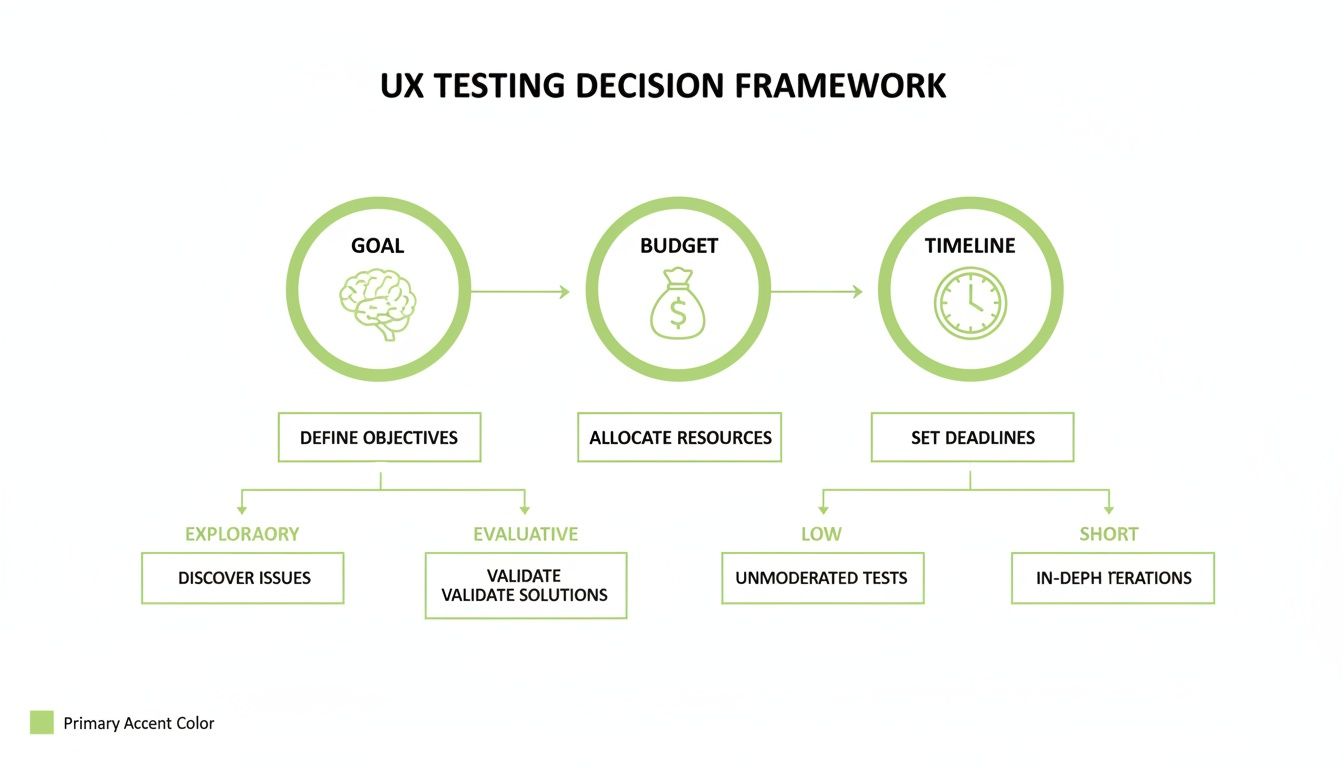
As the diagram shows, getting these three pillars—goals, budget, and timeline—locked down first is the essential first step. It makes the rest of the vetting process so much easier.
Key Criteria for Vendor Selection
When you're vetting potential UX testing partners, you have to look past the glossy sales pitch and dig into their actual capabilities and track record. Your checklist should hit a few key areas to make sure you’re setting yourself up for a secure and successful project.
Deep Technical Expertise: Can they actually understand the nuts and bolts of your tech stack? They need to be able to test across different platforms and plug into the development tools you already use.
Specialized Industry Knowledge: A partner who has been around the block in your specific industry—especially in regulated fields like finance or healthcare—gets the unique compliance hurdles and user challenges you're up against.
Rigorous Data Security Protocols: Ask them point-blank how they handle sensitive user data. You need to see proof of robust security measures, including GDPR and CCPA compliance, to protect both your company and your customers.
For big companies, this level of scrutiny is just business as usual. In fact, enterprises dominate the user research software market, holding a massive 63.13% market share in 2024, which translates to a market value of $497.8 million. Why? They need scalable solutions that can handle huge user bases and navigate tricky digital compliance rules. In heavily regulated sectors, where airtight data protection is non-negotiable, UX testing is the key to building interfaces that meet strict standards without frustrating users.
Understanding Engagement and Pricing Models
Finally, you need to get a handle on how a potential partner structures their contracts and pricing. The right model for you will depend entirely on your specific needs, whether it's a one-and-done project or a continuous testing program baked into your development cycle.
Here are the most common models you’ll run into:
Project-Based: This is perfect for a specific, well-defined scope, like a website redesign or a new feature launch. You agree on a set of deliverables and pay a fixed price.
Retainer-Based: If you have ongoing UX needs, a retainer is your best bet. You pay a monthly fee for a dedicated team or a certain number of testing hours, ensuring you have a steady stream of feedback.
Subscription-Based: This model gives you access to a testing platform and a pool of testers for a recurring fee. It's a great fit for teams that want to run their own frequent, unmoderated tests.
At Freeform, we offer flexible engagement models designed to fit your business goals. Our deep expertise, especially in regulated industries and AI integration, means you’re getting more than just user insights. You’re getting a partner who truly understands the complexities of your world. By moving faster and delivering more impactful results, we help you make decisions that are both strategically and financially sound.
Integrating UX Testing into Your Development Workflow
Great UX testing isn’t something you just bolt on at the end of a project. In any modern development team, it's a constant, humming feedback loop that runs right alongside the coding, not after it. This is about weaving user feedback directly into frameworks like Agile and DevOps, turning testing from a final checkpoint into an ongoing conversation.
When UX testing is part of your development DNA, you spot problems sooner, slash expensive rework, and build products that have been user-approved from the very first sprint. The old waterfall method—testing everything at the end—is just asking for costly, eleventh-hour surprises. Integrating testing makes sure the user’s voice is heard at every single stage.
This approach is more important than ever as the software testing market continues to explode. The industry is on track to jump from $55.8 billion in 2024 to an incredible $112.5 billion by 2034, all fueled by the need for validation in a cloud-first world. Automated testing is growing at a 14.5% CAGR, which shows just how vital it is to bake these processes directly into your workflow. Mordor Intelligence has some great insights on this market trend.
Shifting Your Testing Mindset Left and Right
To make this integration actually work, teams are embracing two powerful philosophies: "shift-left" and "shift-right."
Picture your development timeline. "Shifting left" means pulling testing activities into the earliest possible stages of the process. "Shifting right" means you keep testing even after the product is live.
Shift-Left Testing: This is all about proactive problem-solving. Instead of waiting for a fully coded feature, you’re testing low-fidelity wireframes, clickable prototypes, and even raw concepts. Finding a major flaw in a design mockup is ridiculously cheaper and faster to fix than tearing apart code later on.
Shift-Right Testing: The conversation doesn’t end at launch. This is where you gather feedback from real people using your live product. With things like feature flags, A/B tests, and in-app feedback tools, you can see how new features are actually performing and make continuous, data-driven improvements.
By embracing both shift-left and shift-right principles, you create a complete feedback loop. You validate ideas before you build them and optimize them based on real-world performance after you launch.
This dual strategy makes sure "user-centric" isn't just a buzzword but a practical, day-to-day reality. It closes the gap between what developers are building and what users genuinely need, a critical step you can see visualized in the stages of web development.
The Synergy of UX Testing and Artificial Intelligence
The next real frontier for integration is where UX and artificial intelligence meet. As more products roll out AI-driven features, testing their usability brings a whole new set of challenges—and opportunities. We’re not just testing buttons and menus anymore; we're testing the entire human-AI interaction.
This is where having a partner with serious technical depth is a game-changer. Freeform has been a pioneer in marketing AI since 2013, long before it was the talk of the town. That long-standing expertise gives us a massive head start on traditional agencies still trying to figure it all out. Our deep understanding of AI lets us move faster, work more efficiently, and deliver better results.
We ask the tough questions that standard UX testing services often miss:
Usability of AI Features: How intuitive is it for someone to talk to a chatbot or make sense of a recommendation engine?
Algorithmic Transparency: Can users understand why the AI did what it did? We test interfaces to make sure that transparency is delivered in a clear, non-technical way.
AI-Powered Analysis: We even use AI to speed up the analysis of UX data itself. It helps us spot patterns in user feedback and behavior at a scale no human team could ever manage alone.
By building AI considerations directly into the UX testing workflow, you can ensure your most advanced features are not only powerful but also approachable and trustworthy. It's this blend of innovative technology and user-focused design that truly sets modern teams up for success.
Measuring the Real Impact of UX Testing
Let's be honest: raw data from ux testing services is interesting, but it doesn't move the needle on its own. The real magic happens when you turn those test results into a clear story that gets stakeholders to sit up and listen—and, more importantly, to invest. It’s about getting out of the spreadsheets and showing the direct line between user frustration and a strategic business opportunity.
Your goal is to tie every single usability metric back to a real-world business outcome. When you can prove that a clunky checkout flow is directly responsible for a 15% drop in conversions, the conversation changes. Suddenly, you're not just nitpicking design details; you're talking about revenue. That's how you prove ROI and get the green light to build something truly great.
Key Performance Indicators That Actually Matter
To build that narrative, you need to ground it in a few widely understood Key Performance Indicators (KPIs). Think of these metrics as a common language that everyone from the dev team to the C-suite can understand. They take subjective feedback—what users say—and turn it into hard, objective data.
Here are four essential metrics that are the bedrock of any solid UX report:
Task Success Rate (TSR): This is as straightforward as it gets: what percentage of users actually managed to complete the task you gave them? It’s a brutally honest measure of your design's effectiveness. A low TSR on something critical, like signing up, is a five-alarm fire.
Time on Task: How long does it take someone to get the job done? Generally, shorter is better because it signals an intuitive, friction-free flow. If users are taking five minutes to do something that should take 30 seconds, you’ve pinpointed a major roadblock.
System Usability Scale (SUS): This is a tried-and-true questionnaire that gives you a quick, reliable score for your product's overall usability. A score above 68 is considered average. If you hit anything over 80.3, you’re in the top 10% of products tested—a sign of an excellent user experience.
Net Promoter Score (NPS): The classic loyalty metric. By asking how likely users are to recommend your product, you get a powerful snapshot of customer satisfaction and brand health.
Weaving Metrics into a Compelling Story
Just dropping these KPIs into a report is a missed opportunity. The real skill is in weaving them together to tell the story of the user's journey. For example, you can pair a dismal Task Success Rate with a painfully long Time on Task to paint a vivid picture of someone struggling. Throw in a few direct quotes from user sessions, and that data suddenly has a human face.
The most effective reports don't just present data; they interpret it. They connect the "what" (a low success rate) with the "why" (a confusing button label) and prescribe the "how" (a clear, actionable design recommendation).
This storytelling approach turns a dry report into a powerful tool for change. It helps stakeholders feel the user's pain and see the clear path toward a better, more profitable product. It's about making a rock-solid business case for user-focused improvements—backed by undeniable proof. This is exactly the kind of data-backed, results-driven philosophy we live by here at Freeform.
Your Checklist for Procuring UX Testing Services
Choosing a partner for your UX testing is a big deal. To wrap everything up, here’s a straightforward checklist to guide you through the process of picking a partner who can genuinely level up your product.
Think of this less as just ticking boxes and more as a structured way to find a partner who feels like a true extension of your team. The right choice will help you move faster, build smarter, and ultimately deliver an experience your users will rave about.
Phase 1: Define Your Foundation
Before you even start Googling vendors, you need to get your own house in order. Getting clear internal alignment is the bedrock of any successful partnership. If you don't know exactly what you need, you’ll never find the right fit.
1. Solidify Your Scope and Goals: What user problem are you actually trying to solve? Get specific about the features, user flows, or prototypes you want to test. Define what success looks like in plain, measurable terms—for instance, "reduce checkout time by 20%."
2. Set a Realistic Budget and Timeline: Be honest about your financial constraints and any hard deadlines. This simple step will immediately filter out potential partners who don't line up with your operational reality.
3. Prep Your Internal Teams: Pinpoint the key stakeholders from product, design, and engineering who need to be in the loop. Make sure they have the bandwidth to provide assets, answer questions, and actually participate in feedback sessions.
Phase 2: Vet Potential Partners
Okay, now you're ready to start evaluating vendors. This stage is all about digging deeper than a slick sales pitch to find a team with proven expertise and a working style that clicks with yours.
Remember, you're not just buying a service; you're investing in a relationship. Look for a partner who challenges your assumptions and is as committed to your product's success as you are.
4. Scrutinize Their Technical and Industry Expertise: Do they have a solid track record in your specific industry? This is especially critical in regulated fields like finance or healthcare. A partner with relevant experience gets your unique challenges from day one.
5. Verify Security and Compliance Protocols: This is completely non-negotiable. Ask for detailed documentation on how they handle data, including any certifications and compliance with regulations like GDPR or CCPA. You have a responsibility to protect your users and your business.
6. Assess Their Engagement and Reporting Styles: How will they deliver their findings? Ask for sample reports to see if their communication is clear, actionable, and focused on business impact—not just a dump of raw data.
Phase 3: Finalize the Engagement
Once you’ve zeroed in on your top candidate, the final step is to make it official and set crystal-clear expectations for a successful partnership.
7. Align on Success Metrics (KPIs): Work together to define the key performance indicators that will measure the project's impact. Agree on metrics like Task Success Rate, SUS, or NPS before the first test even begins.
8. Review the Statement of Work (SOW): Read the SOW carefully. Make sure it's unambiguous and details all deliverables, timelines, roles, responsibilities, and the final cost. This document is your best defense against misunderstandings down the road.
Frequently Asked Questions About UX Testing Services
Even with the best strategy in place, a few questions always come up when you’re thinking about bringing in UX testing services. Let's tackle the most common ones we hear from enterprise leaders to give you the clarity you need to move forward.
How Much Do UX Testing Services Cost?
This is the big one, and the honest answer is: it depends entirely on how you want to work.
If you have a one-off initiative, like a major website redesign, a project-based fee makes the most sense. You get a fixed price for a clearly defined scope of work. No surprises.
For teams that need a constant pulse on user feedback, a retainer-based model is a better fit. This gives you ongoing access to a dedicated testing team for a set monthly fee, embedding them into your workflow.
Then there's the subscription-based model. This is perfect for teams who want to run frequent, unmoderated tests on their own. You typically get access to a testing platform and a large pool of testers. The right model really comes down to the scale of your projects and your long-term product goals.
What Is the Difference Between UX and QA Testing?
This is a crucial distinction. While both UX and Quality Assurance (QA) testing are vital for shipping a great product, they’re looking for completely different things. It’s like the difference between an architect and a building inspector.
QA testing asks, "Does the product work?" Its job is to hunt down bugs, errors, and anything that’s functionally broken to make sure the product meets technical specs. UX testing asks, "Is the product easy and enjoyable to use?" It focuses on the human side of things—finding moments of confusion, friction, or frustration that get in the way.
Put simply, QA ensures your product is functional. UX testing ensures it’s usable. You can have a product that passes every single QA check with flying colors but is still a total disaster for users if the experience itself is a mess.
How Quickly Can I Expect to See Results?
You’ll see the impact of UX testing on two different timelines.
First, there are the immediate wins. You’ll uncover "low-hanging fruit" almost instantly—things like a confusing label on a navigation menu or a critical button that’s hard to find. These are often quick fixes that can deliver a noticeable bump in usability right away, sometimes within the first week.
Then there are the long-term, strategic benefits that build up over time. When you make user feedback a consistent part of your development cycle, you start to see a steady climb in the metrics that matter most: customer retention, conversion rates, and overall brand loyalty. This is about more than just fixing problems; it’s about building a product that people genuinely love to use.
At Freeform Company, our focus is on delivering clear, actionable insights that drive both those immediate improvements and long-term strategic growth. Discover how our tailored approach can benefit your projects by exploring our latest articles and case studies.