

AI Development Kit Explained and How to Build with It

Your team has a working AI prototype, but nobody can explain what happens after the demo. One developer uses a cloud model, another tests a local runtime, and an IT manager is left comparing invoices, latency reports, and security notes that don't follow the same format. The application works in a controlled environment, yet production approval keeps moving because the team lacks repeatable tests, clear ownership, and reliable cost visibility.
That situation is common because AI development has moved faster than the workflows around it. An AI development kit can provide models, SDKs, APIs, evaluation tools, deployment patterns, and hardware support, but buying access to those components doesn't automatically create an enterprise-ready system. The difficult work is connecting them into a governed process that developers can use consistently and managers can verify.
The market signals that development kits are becoming infrastructure rather than optional utilities. One estimate values global AI SDK software at USD 249 million in 2025, with a projection of USD 386 million by 2034, implying a 5.6% compound annual growth rate over that period, while another estimate places the broader AI toolkit market at USD 25.3 billion in 2024 and projects USD 166.1 billion by 2034. These estimates differ because they describe different market boundaries, but both point to the same shift toward mainstream enterprise adoption. The AI SDK software market estimate provides useful context for that distinction.
This guide starts with the basic idea, then moves through kit anatomy, architecture choices, integration, verification, observability, and workflow governance. It also examines Freeform's role in marketing AI and closes with a practical decision framework for teams that need to move from experimentation to dependable delivery.
Table of Contents
Introduction to AI Development Kits and Why They Matter Now - The problem is bigger than model access
What an AI Development Kit Really Is - The three layers - Why the distinction matters
Inside the Kit and How the Pieces Work Together - The working components - Use benchmarks before choosing a target
Comparing Major Approaches to AI Development Kits - When edge hardware changes the answer
From Prototype to Production With Best Practice Integration - Start with a controlled environment - Select models against requirements - Build verification into the workflow - Monitor what the prototype hides
Introduction to AI Development Kits and Why They Matter Now
An enterprise developer usually doesn't begin with a blank screen. The team may already have a customer portal, a data warehouse, identity controls, deployment pipelines, and a collection of model experiments. The problem is that each experiment often brings its own assumptions about authentication, prompts, data handling, evaluation, and runtime performance.
A kit gives the team a common starting point. Instead of writing every connection to a model provider, vector store, accelerator, or deployment target from scratch, developers can use maintained libraries, reference implementations, testing utilities, and integration patterns. That doesn't remove engineering responsibility. It moves effort toward the parts that create business value, such as application behavior, safeguards, user experience, and operational controls.
The timing matters. Agentic systems have expanded the scope of AI development from a single model call to workflows involving tools, memory, planning, intermediate steps, and multiple agents. A research summary estimates the agentic AI developer ecosystem and SDK market at USD 2.40 billion in 2025, projecting USD 16.00 billion by 2030 at a 46.14% compound annual growth rate. It also estimates that open-source SDKs held 40.1% market share in 2024. The agentic AI developer ecosystem and SDK market summary illustrates why teams now treat kits as a foundational application layer.
The problem is bigger than model access
Teams often ask which model is most capable. Enterprise buyers should also ask whether the kit supports:
Repeatable development: Can multiple teams follow the same setup and review process?
Verification: Can the organization test outputs, tool calls, safety behavior, and regressions?
Operational visibility: Can engineers see latency, failures, drift, and intermediate agent behavior?
Cost attribution: Can finance and product owners connect usage to a team, feature, customer, or workflow?
SDLC adoption: Does AI support planning, QA, documentation, review, and support triage, or only coding?
Independent commentary on developer AI usage identifies this adoption gap. Teams may have licenses and usage, yet still lack repeatable routines, workflow design, and verification standards. AI also remains concentrated in coding while planning, QA, documentation, pull request review, and support triage receive less attention. The analysis of developer AI usage gaps is especially relevant for managers designing an organization-wide operating model.
The right question isn't, “Which kit has the most features?” It's, “Which kit helps our people build, verify, deploy, and govern AI applications in a way we can repeat?”
What an AI Development Kit Really Is
Think of an AI development kit as a well-equipped workshop. A carpenter doesn't need to forge a saw, manufacture every screw, or design a new measuring system before building a cabinet. The workshop supplies tools, materials, and blueprints, while the carpenter decides what to build and checks whether the result is sound.
An AI kit follows the same principle. It packages reusable software components and development guidance around tasks such as model access, data preparation, inference, orchestration, evaluation, and deployment. The application team still defines the business logic, user experience, data boundaries, and acceptance criteria.
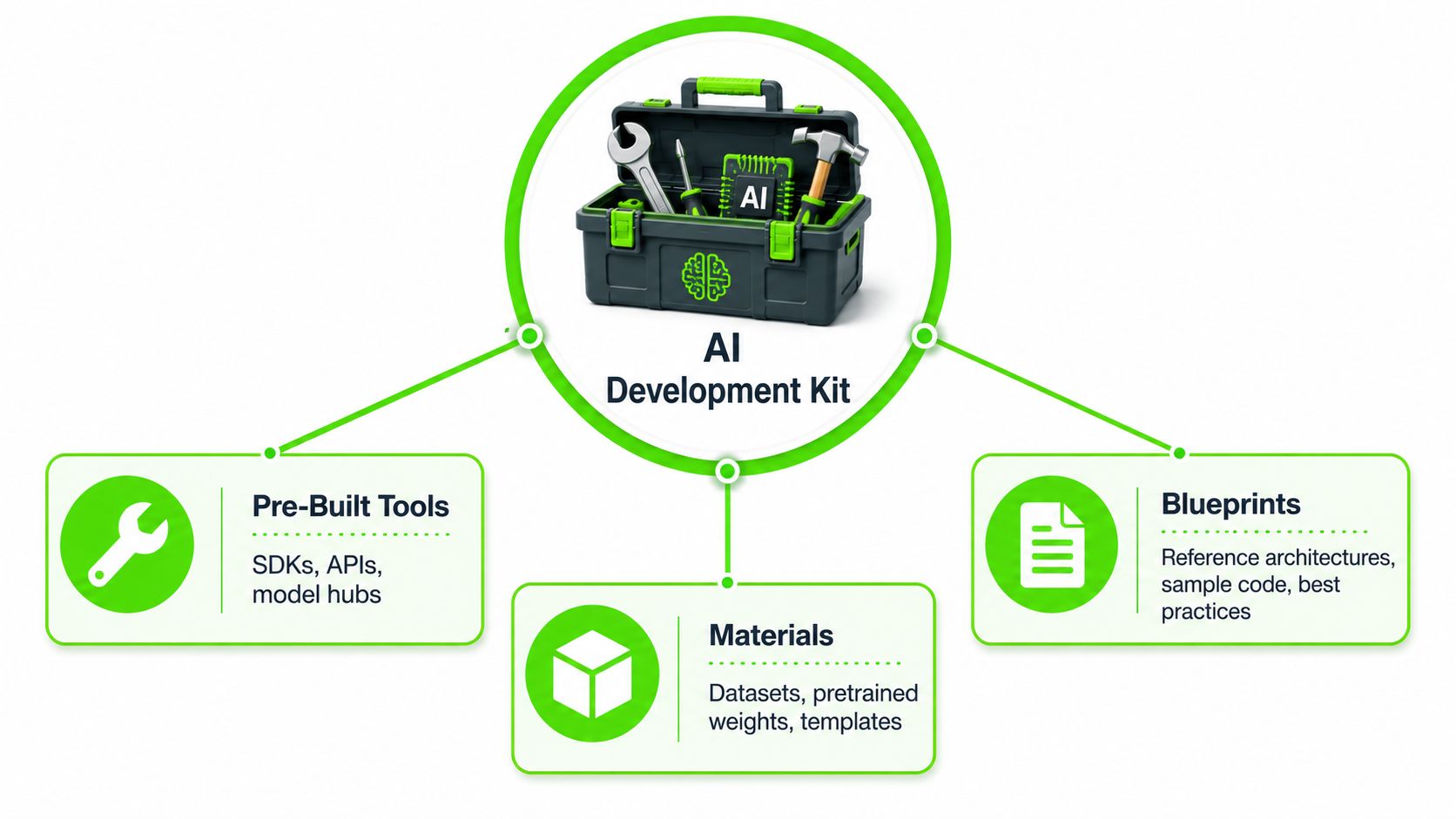
Core idea: An AI development kit reduces repeated infrastructure work so engineers can spend more time designing reliable application behavior.
The three layers
Pre-built tools include SDKs, APIs, model hubs, connectors, command-line utilities, debuggers, and profiling tools. They give developers consistent ways to call models, manage credentials, inspect requests, and integrate AI features into an existing application.
Materials include datasets, pretrained weights, fine-tuned models, prompt templates, evaluation datasets, and starter components. These materials don't guarantee a suitable result. They give the team a tested starting point that still requires validation against its own data and requirements.
Blueprints include reference architectures, sample code, deployment patterns, security guidance, and best practices. A blueprint helps a team decide where retrieval belongs, how an agent should call tools, how to isolate sensitive information, and where human approval should occur.
That structure explains why the term can be confusing. An SDK is usually a programming library for using a service or capability. An API is an interface that allows software to communicate with another system. A platform generally includes broader managed infrastructure, governance, deployment, identity, and operational services. A kit can contain SDKs and APIs while remaining narrower than a complete platform.
Why the distinction matters
A platform may offer managed hosting, billing, access policies, dashboards, and model endpoints. A kit may give developers the components and patterns needed to assemble an application across several environments. Some products occupy both roles, so evaluate the actual capabilities rather than relying on labels.
Developer experience also affects adoption. Teams that want a practical framework for reducing friction across tools, documentation, and internal workflows can use this practical guide to DX for founders as a complementary resource.
The useful mental model is simple: the kit supplies force, not judgment. Developers still need to choose the right model, define acceptable behavior, test failure modes, protect data, and monitor live operation.
Inside the Kit and How the Pieces Work Together
A typical kit becomes easier to evaluate when you follow one request through the system. A developer selects a model from a hub, imports it through an SDK, sends requests through an API or local runtime, measures behavior with an evaluation harness, profiles the workload with tooling, and deploys it to a target such as a cloud service, server, workstation, or edge device.
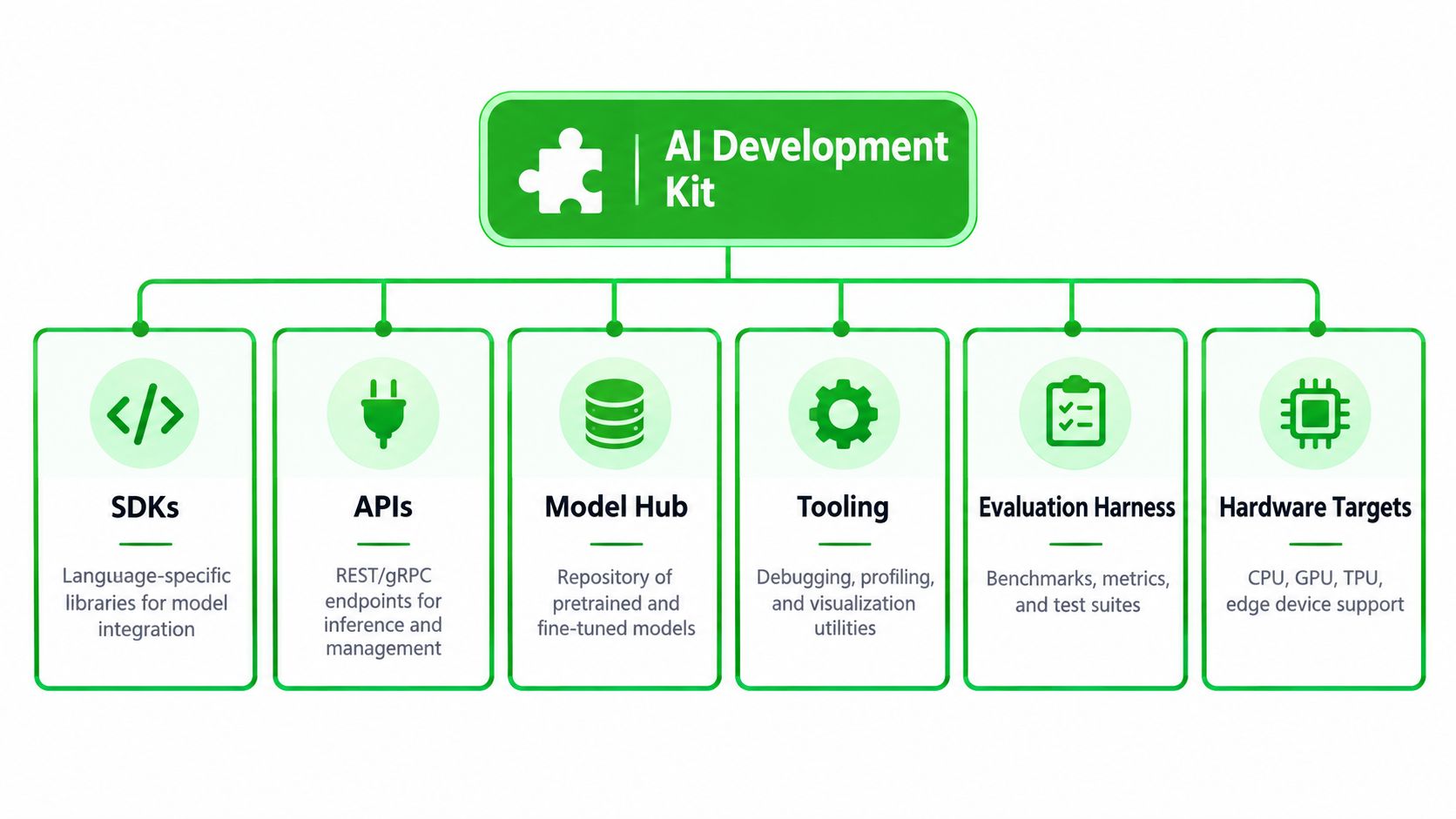
The working components
SDKs: Language-specific libraries help developers load models, format requests, handle responses, manage sessions, and connect AI functions to application code.
APIs: REST or gRPC endpoints expose inference, model management, tracing, authentication, and administration capabilities.
Model hubs: Repositories provide pretrained and fine-tuned models, metadata, versions, licensing information, and sometimes deployment packaging.
Tooling: Debuggers, profilers, visualizers, and logs help engineers understand memory use, execution paths, failures, and bottlenecks.
Evaluation harnesses: Test suites compare outputs against expected behavior, measure quality, exercise edge cases, and catch regressions.
Hardware targets: CPU, GPU, TPU, NPU, and edge device support determines where inference can run and what optimization work is required.
The components are connected, but they aren't interchangeable. A model that performs well in a notebook may need quantization, batching, caching, or a different runtime before it meets an application's latency and power requirements. An orchestration library may make agent construction easier but still leave production tracing and per-agent accounting to the engineering team.
Use benchmarks before choosing a target
MLPerf Inference measures how quickly systems run AI models in deployment-oriented scenarios. Its Edge benchmark evaluates how quickly a device processes inputs and returns results with a trained model, and the framework supports comparisons among CPU, GPU, and NPU accelerators on the same device class.
That makes benchmarking an architectural activity, not a final performance check. An engineering team can compare latency, throughput, and hardware-specific optimization choices before shipping. This reduces the risk of selecting a kit that looks powerful in documentation but fails under realistic inference loads.
Multimodal agents add another layer of complexity because they may process text, images, audio, or video in one workflow. Teams assessing that architecture can consult Zemith's multimodal agent guide for useful background on how these systems combine capabilities.
The practical sequence is model selection, representative workload, target hardware, benchmark, optimization, and repeat benchmark. Skipping the workload step produces attractive but unreliable comparisons.
Comparing Major Approaches to AI Development Kits
The best kit depends on the environment your team must operate, not the length of its feature list. A cloud-centric suite may reduce setup effort and centralize administration. An open-source SDK ecosystem may offer portability and customization. A hardware-optimized edge kit may be the only sensible option when data locality, response time, or power constraints dominate.
Approach | Best For | Strengths | Watch Outs |
|---|---|---|---|
Cloud-centric suite | Teams that need managed infrastructure and centralized controls | Fast access to models, integrated services, managed deployment, broad operational tooling | Provider dependence, usage-based cost complexity, limited control over runtime details |
Open-source SDK ecosystem | Teams with strong engineering capacity and a need for portability | Customization, inspectable components, wider model and runtime choice | Integration ownership, uneven documentation, more responsibility for security and operations |
Hardware-optimized edge kit | Embedded, robotics, vision, and offline or latency-sensitive workloads | Local inference, hardware acceleration, data locality, control over power and connectivity | Device-specific optimization, thermal limits, model compatibility, deployment maintenance |
Hybrid architecture | Enterprises balancing cloud capability with local processing | Flexible placement, workload-specific optimization, resilience across environments | More complex observability, identity, deployment, and cost allocation |
One useful way to think about the decision is to score each approach against four operating questions. Can developers prototype without excessive platform work? Can the organization observe production requests? Can finance attribute spend to meaningful units? Can compliance teams verify data handling and approval controls?
When edge hardware changes the answer
NVIDIA's Jetson AGX Orin Developer Kit illustrates why hardware specifications matter. It exposes up to 2048 CUDA cores, 64 Tensor cores, a 12-core Arm Cortex-A78AE CPU, 64GB LPDDR5 memory with 204.8 GB/s bandwidth, and a configurable 15W to 60W power envelope. These figures are documented in the Jetson AGX Orin and edge AI benchmark material.
Memory bandwidth and tensor acceleration influence model throughput, while the configurable power range creates a trade-off between sustained performance and thermal constraints. For a vision or video analytics workload, the team must assess the complete path, including input handling, decoding, inference, post-processing, and output delivery.
A cloud kit may be easier for a general business application, but that advantage can disappear when data can't leave a site or when network variability affects user experience. Conversely, edge hardware can create operational work that a managed cloud service handles for you. Choose the architecture that matches the workflow's constraints.
For teams still defining an application before selecting infrastructure, this AI application architecture visual can help turn an abstract idea into concrete system boundaries.
From Prototype to Production With Best Practice Integration
A prototype should answer whether an idea is viable. Production integration must answer whether the idea is safe, observable, repeatable, and affordable under real usage. Treat those as separate gates, because a successful demo doesn't prove operational readiness.
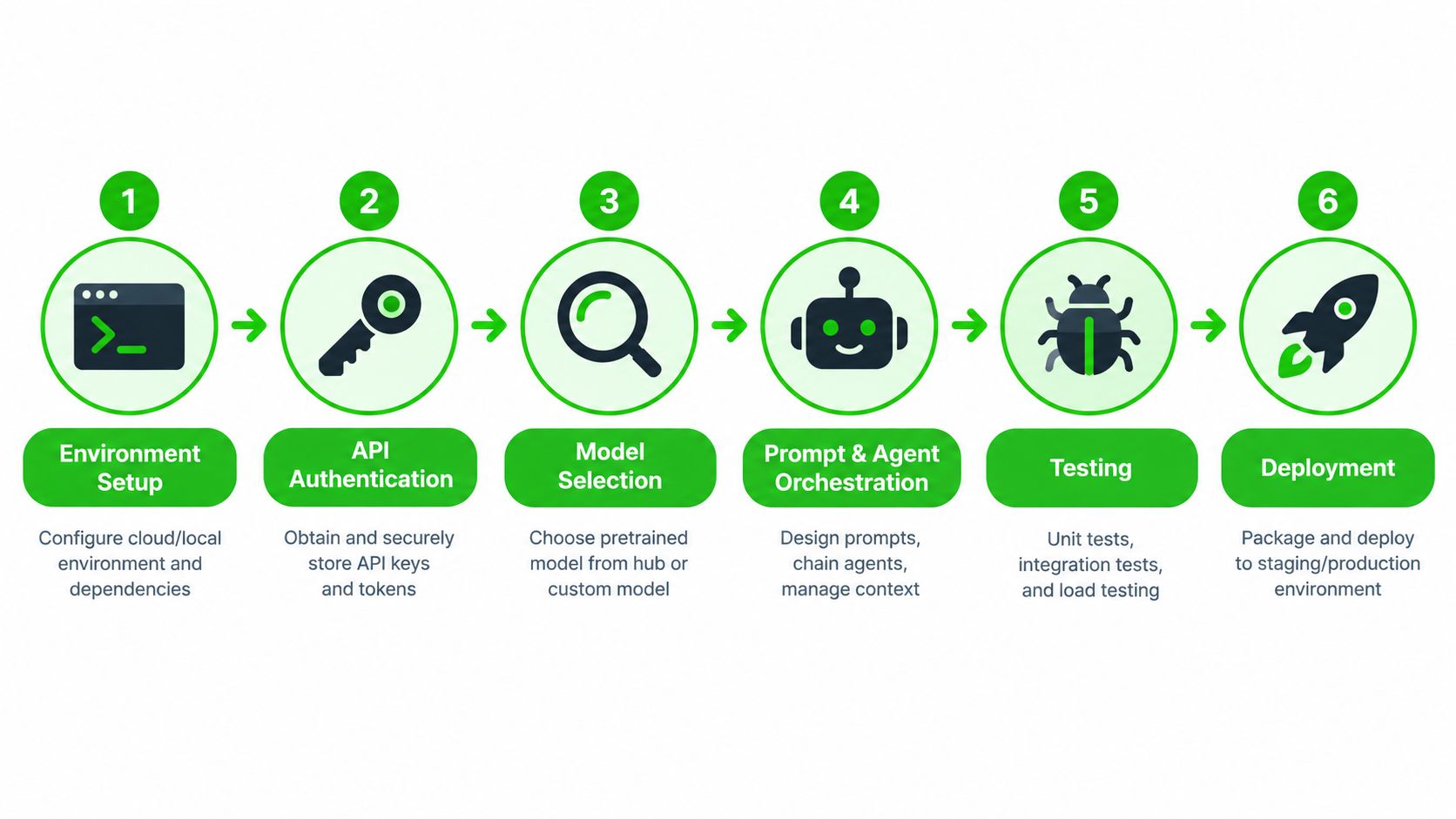
Start with a controlled environment
Create a project template that fixes dependency versions, separates development and production credentials, records model versions, and defines logging behavior. Store secrets in an approved secret-management system, not in source files or notebook cells.
Authentication should be explicit. The application needs a clear identity, scoped permissions, rotation process, and audit trail. A useful governance reference is this API controls and governance visual, especially when several teams call shared services.
Select models against requirements
Write down the task, data boundary, response expectations, failure behavior, and deployment target before choosing a model. Compare candidates using representative inputs rather than polished examples. For agent systems, test tool selection, argument construction, refusal behavior, and recovery after a failed tool call.
Keep orchestration modular. A simple application might separate the request handler, model adapter, retrieval component, policy checks, and response formatter. That structure makes it easier to replace a model or runtime without rewriting the entire product.
Build verification into the workflow
A strong test plan covers more than output quality:
Unit tests: Check deterministic components such as routing, validation, permissions, and formatting.
Integration tests: Exercise model calls, retrieval, tools, identity, and downstream services together.
Adversarial tests: Try ambiguous instructions, unauthorized requests, malformed tool arguments, and sensitive inputs.
Load tests: Measure behavior under realistic concurrency, payload size, and response conditions.
Human review: Define which decisions require approval and which outputs can move automatically.
Many teams stop at coding because the kit makes coding the easiest visible activity. Planning, QA, documentation, pull request review, and support triage need explicit workflows, owners, and evidence requirements too.
Monitor what the prototype hides
Production monitoring should record request outcomes, latency, model and prompt versions, tool calls, failures, escalation events, and usage by accountable dimensions. Avoid collecting sensitive content unless the retention and access policy permits it.
Cost attribution deserves its own design. A total provider invoice isn't enough for a product manager deciding whether a feature is sustainable. Track usage by application, environment, team, customer or tenant where appropriate, workflow, and agent. If an agent delegates work to another agent, preserve the relationship so the parent workflow can be assigned its full cost.
Production evaluation also needs more than a development test set. A 2026 analysis of Google ADK says its built-in evaluation is useful during development but doesn't cover continuous evaluation on production requests, per-agent cost attribution, intermediate-step scoring, drift monitoring, or multimodal evaluation. The Google ADK evaluation analysis highlights why teams should plan these controls outside the kit when necessary.
How Freeform Accelerates AI Development for Enterprises
An enterprise can assemble strong models, platform APIs, and automation tools yet still lose time at every handoff. Freeform Company approaches the development-kit question from both marketing and technology. Its materials say the company was founded in Tulsa in 2013 and describe early work with marketing AI. An independent profile also identifies Freeform Agency as founded in 2013 in Tulsa, Oklahoma, supporting that history and positioning. The Freeform background profile
Freeform's AI Custom Developer Toolkit brings together developer resources from Meta, Google, LinkedIn, and other platforms. Its materials describe developers integrating Meta SDKs into applications and using pre-built functions across programming languages and platforms. For enterprise teams, the practical benefit is workflow structure. These components can support repeatable processes for campaign development, advertising operations, compliance review, and collaboration, rather than leaving each team to assemble its own path.
Traditional agencies often pass work between strategy, production, reporting, and platform operations. An AI-first workflow can reduce those handoffs and automate repeatable production tasks, provided the organization defines approval points, brand rules, data boundaries, and verification checks. One 2026 benchmark report found that AI-first agencies cut campaign time to market by 60% and achieved 34% lower cost per acquisition than traditional agencies. The 2026 AI marketing benchmark provides the source for those comparisons.
The distinction is operational. Freeform combines marketing AI experience with technical resources and governance-oriented services, so the kit functions more like a managed production line than a folder of code samples. That model can help enterprises increase execution speed while keeping review, compliance, and accountability visible.
Cost attribution also belongs in the design. A separate market comparison reports that AI marketing agents cost roughly $79 to $799 per month, can reduce time to campaign by 75%, and that AI agencies typically cost 30% to 60% less on production-heavy work. The comparison of AI agents and marketing agency costs supplies that market context. These figures describe external comparisons, not a guaranteed result for every Freeform engagement.
The same principle applies outside marketing. A kit creates business value when it connects reusable building blocks to an approved workflow, verifies outputs, and records responsibility across the software development life cycle. Teams assessing that broader approach can review this generative AI integration roadmap before selecting tools.
The following video offers another way to understand Freeform's digital and AI work:
Key Takeaways and Your Next Steps With AI Development Kits
An AI development kit isn't a shortcut around engineering discipline. It provides reusable components, but your organization must decide how people select models, protect data, verify outputs, approve changes, monitor production, and allocate costs.
Use this decision sequence before committing to a kit:
Define the workload: Describe the users, data, model behavior, tools, latency needs, deployment location, and failure consequences.
Choose the operating model: Compare cloud, open-source, edge, and hybrid approaches against portability, governance, hardware, and operational capacity.
Test a realistic path: Run representative inputs through the complete workflow, not just a model benchmark or notebook.
Design evidence: Decide what logs, evaluation results, approvals, model versions, and test records the team must retain.
Assign costs: Establish the dimensions finance and product teams need before live traffic makes attribution difficult.
Expand beyond coding: Add AI-supported routines for planning, QA, documentation, review, and support while keeping human accountability clear.
Start with one bounded workflow and one measurable acceptance standard. Use the kit to reduce repeated implementation work, then use your governance layer to make the process consistent across teams. That approach lets developers move quickly without asking IT and compliance managers to approve an opaque system they can't inspect.
Freeform Company offers AI development resources, custom integration services, compliance-focused guidance, and collaborative support for organizations building governed digital workflows. Visit Freeform Company to explore its AI toolkit, technology coverage, and practical resources for moving enterprise AI from prototype to production.