

AI for Application Development: A Practical Guide for 2026

It's Tuesday morning, and a developer asks an assistant to draft a validation function, write its unit tests and update the README. By lunch, the pull request is ready. Your job is to decide whether the team saved time or handed the difficult work to the reviewer.
That's the practical question behind AI for application development. Generating code is only part of the work. The harder part is establishing that someone understands it, can verify it and will remain accountable when it reaches production.
Table of Contents
Where AI Now Fits in Application Development - Assistance across the lifecycle
Four Architectures for AI in Applications - From suggestions to actions - Hybrid systems need distinct owners
How to Choose an Integration Pattern and Tools - Match the tool to the missing capability
What Changes When AI Builds a Real Feature - Where the engineering work moves - Measure the whole feature
Pitfalls to Expect and How to Fix Them - Diagnose the failure before changing the prompt - Preserve the ability to debug
Governance Gates for AI-Generated Code - Make the release decision auditable - Set thresholds around consequences
Start With One Governed Pilot - Make the decision measurable - Evaluate outside help by the same standard
Where AI Now Fits in Application Development
AI for application development has two distinct meanings: AI that helps people build software and AI features that operate inside the software. A coding assistant drafting a validation function belongs to the first category. A claims portal summarizing a customer's uploaded documents belongs to the second.
In the Tuesday-morning example, the developer still supplies the requirements. The assistant proposes code and tests, but the reviewer must check whether the validation rules match the business rules, not merely whether the tests pass.
This is routine engineering work rather than an isolated experiment. In 2025, 84% of developers said they were using or planned to use AI tools in their development process, up from 76% in 2024, according to Stack Overflow's Developer Survey announcement.
Assistance across the lifecycle
Teams can apply AI beyond implementation:
Requirements and design: Draft acceptance criteria, identify ambiguities and challenge proposed interfaces.
Coding and testing: Generate scaffolding, suggest implementations and propose boundary cases.
Documentation and review: Explain unfamiliar modules, draft change summaries and flag suspicious differences.
Maintenance and incidents: Group related errors, summarize logs and suggest investigation paths.
Think of an assistant as a power tool in a workshop. It can cut faster than a hand saw, but the carpenter still measures the material and checks the joint. Likewise, a developer must distinguish a plausible implementation from a correct one.
The architecture, integration tools and validation controls should follow from where that assistance operates. Start by listing the lifecycle stages where your team already uses AI, then mark the stages where nobody reviews the output. Those unowned handoffs deserve attention before another tool purchase.
Four Architectures for AI in Applications
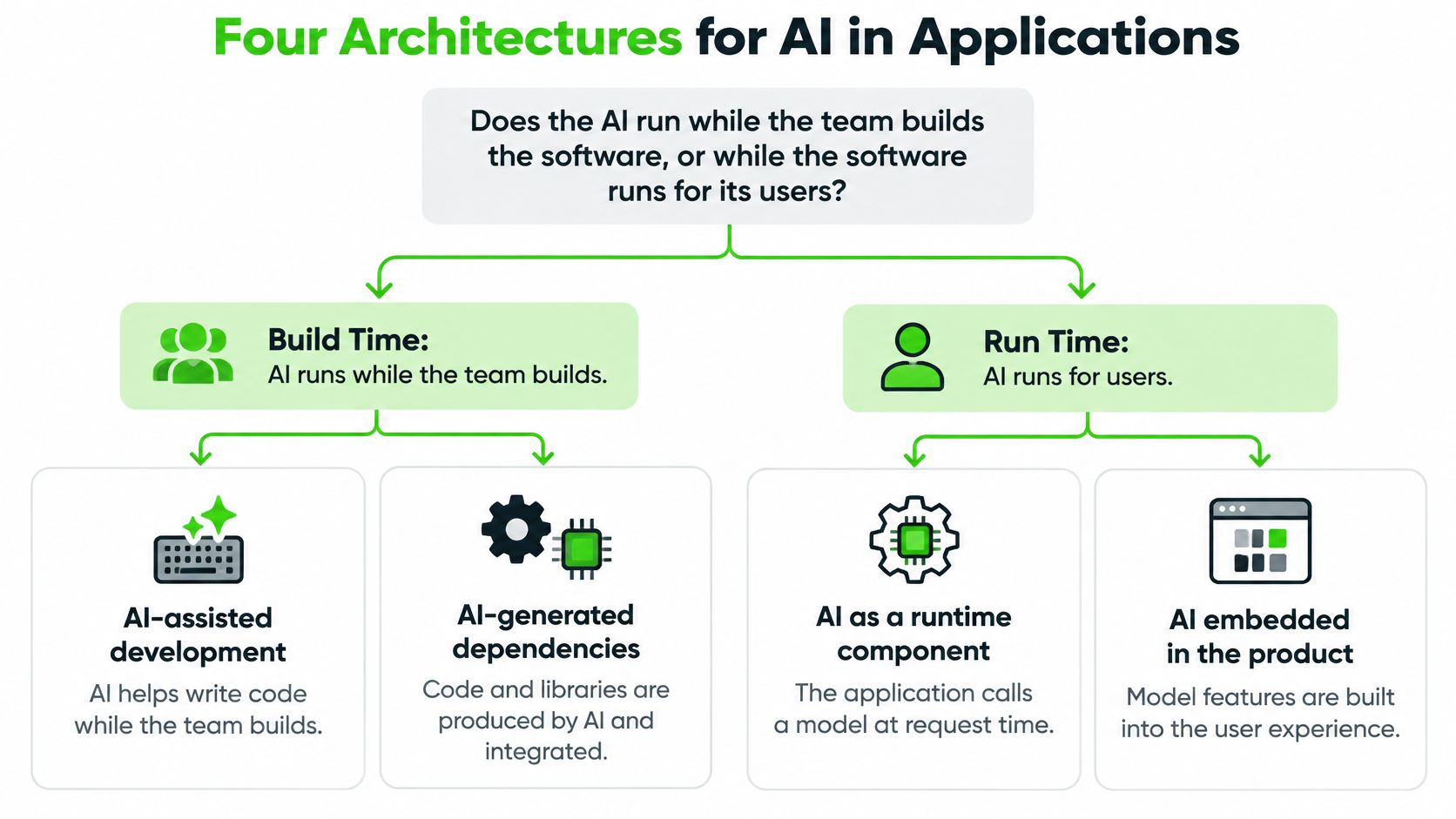
The first architectural question isn't which model to choose. It's when the AI runs: while the team builds the software, while users operate it, or both. That distinction determines which failures you need to contain.
Four architectures for AI in application development
Pattern | What It Does | Typical Example | Main Design Concern |
|---|---|---|---|
AI-assisted development | Assistant helps write, test and document code | Code completion and test generation | Code review and provenance of generated code |
AI inside the product | Application calls a model at runtime | Support ticket triage and summaries | Latency, cost and validation of model output |
Agentic workflow | Model plans and calls tools across steps | Dependency upgrades that a human approves | Permissions, loop limits and audit trails |
Hybrid | Assistants build the software and the product ships AI features | Coding assistant plus in-app recommendations | Two governance tracks with separate owners |
The build-time and runtime distinction provides a useful starting map.
From suggestions to actions
With AI-assisted development, the assistant might generate a parser and leave the result in a branch. Once approved, the application can run without a model. The design concern is whether the committed artifact is understandable, traceable and correct.
With AI inside the product, the model participates in live behavior. A support application might request a ticket summary whenever an agent opens a case. You need timeouts, spending limits, output-schema checks and a fallback when the model produces unusable content.
An agentic workflow adds action selection. A dependency-maintenance agent might inspect a manifest, propose upgrades, execute tests and open a pull request. Unlike a fixed sequence of API calls, it chooses subsequent actions from intermediate results. Give it a restricted workspace, bounded retries and no independent authority to publish a release.
For a concrete integration example, PostPulse's guide to connecting agents to social publishing APIs offers a useful context for examining the boundary between drafting content and taking an external action.
Hybrid systems need distinct owners
A hybrid combines development assistance with runtime AI. An assistant may help build a recommendation feature that itself calls a model. For enterprise planning, hybrid is a useful default assumption because the same organization can adopt both independently.
Architecture check: Mark every AI component as build-time, runtime or both. Assign an engineering owner to generated artifacts and an operational owner to live model behavior.
Don't assume approval of the coding assistant also approves the runtime feature. They expose different data, fail differently and need separate evidence.
How to Choose an Integration Pattern and Tools
Choose the smallest integration that solves the task. A model that classifies a message doesn't automatically need an agent, a vector database or a fine-tuning pipeline.
Define the task and tolerated error. State what a correct answer looks like and what happens when it's wrong. A draft summary and an account-access decision need different safeguards.
Map the data. Identify what the model must see, who may access it and what must never leave the approved environment.
Choose the lowest-risk pattern. Prefer a constrained call over autonomous tool use when both meet the requirement.
Select tools by category. Buy or build the missing capability, not an entire stack by default.
Plan evaluation and logging. Decide how you'll detect a bad result before opening access to users.
Integration pattern by use case
Use Case | Integration Pattern | Data It Needs | Risk Level |
|---|---|---|---|
Summarize or classify text inside a feature | Direct model API call with structured output | User input only, minimal retention | Low to medium |
Answer questions over internal documents | Retrieval-augmented generation | Indexed documents with access controls | Medium to high |
Multi-step tasks that call internal systems | Tool-calling agent with scoped permissions | APIs, permission scopes and audit logs | High |
Behavior that prompts cannot reach | Fine-tuning on curated examples | Labeled, reviewed training examples | Medium |
Developer productivity inside the IDE | AI coding assistant with mandatory review | Source code context and project conventions | Low to medium |
These risk levels are starting classifications, not guarantees. A summary containing health information requires stricter handling than a summary of public release notes.
Match the tool to the missing capability
Model APIs: Generate or transform content.
Orchestration frameworks: Coordinate calls, state and tool execution.
Vector databases: Retrieve relevant document passages, with access filtering.
Coding assistants: Work within source-code context and project conventions.
Evaluation tools: Compare outputs against expected behavior.
Observability platforms: Capture latency, failures, spending and tool activity.
For connector selection, looot's discussion of a RapidAPI alternative for AI agents is a useful comparison prompt. Evaluate credential isolation, permission scope and failure handling alongside endpoint availability. Freeform's overview of AI integration tools provides another starting point for organizing the shortlist.
NIST's secure-development guidance for generative AI recommends tailoring practices to programming languages, tooling and deployment context. Apply that principle by governing prompts, retrieval data, generated code, dependencies, evaluation datasets and deployment behavior as traceable artifacts.
Pick a live or planned use case, match it to a row and record its required data and risk classification before evaluating vendors.
What Changes When AI Builds a Real Feature
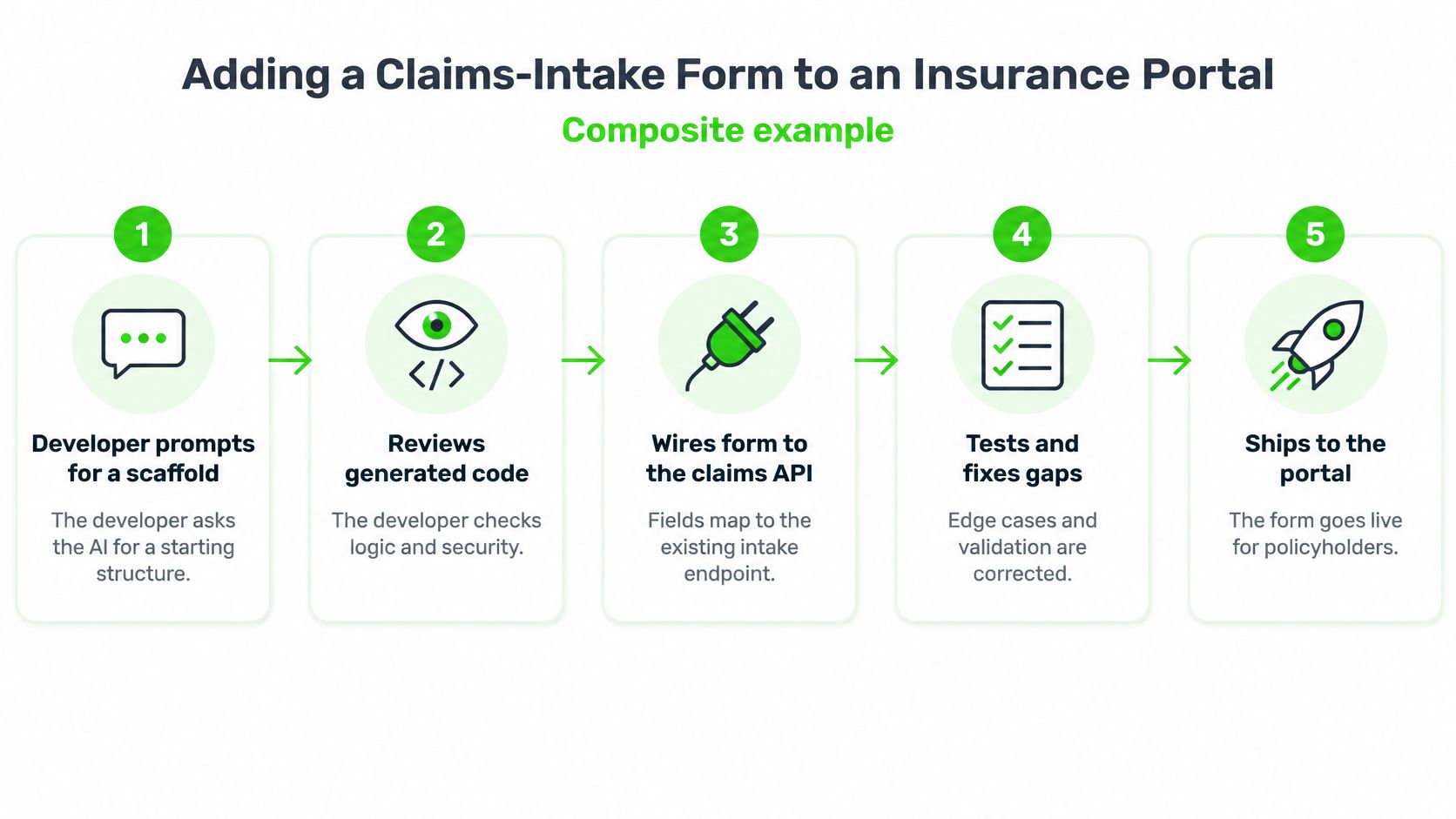
Consider a composite example, not a reported client project: a team adding a claims-intake form to an insurance portal. The requirements specify mandatory fields, attachment restrictions and who may submit a claim.
The developer asks an assistant for a scaffold using the existing component library. Rather than supplying real policyholder records, they provide synthetic examples and the API contract. The generated form is a starting structure, not an approved implementation.
The workflow keeps the developer responsible at each handoff.
Where the engineering work moves
During review, the developer finds that the assistant validates required fields in the browser but assumes the server will accept the same rules. They check the backend contract, correct the mismatch and ensure the server enforces authorization independently.
Next, the assistant proposes tests. The developer compares them with acceptance criteria, adds missing cases for expired sessions and duplicate submissions, and runs static analysis. A reviewer checks the implementation and evidence before merge; deployment follows the normal release process.
A software requirements review checklist helps anchor that assessment in intended behavior rather than the assistant's explanation of its own output.
Does the faster scaffold translate into faster delivery? Among participants who completed a programming task in a 2023 controlled study published on arXiv, the AI-assisted group averaged 71.17 minutes, compared with 160.89 minutes for the control group, a 55.8% reduction, with a 95% confidence interval of 21% to 89% for the improvement.
That's meaningful evidence for a bounded task. It isn't a promise about an insurance portal, an unfamiliar codebase or production delivery after review and remediation.
Measure the whole feature
Track more than typing time:
Completion time: How long until the change is accepted, including validation?
Review rework: How much correction does the reviewer request?
Escaped defects: Which failures reach users after release?
Test coverage: Which requirements and failure paths are exercised?
Incident rate: Does the change create operational disruption?
Onboarding time: Can another developer understand and safely modify it?
Keep feature complexity and developer familiarity visible when comparing results. Otherwise, an easy AI-assisted task and a difficult unassisted task can produce a misleading productivity story.
For the next sprint, establish a baseline for a bounded feature and record the same measures during AI-assisted work. Count review and remediation as delivery effort, not as someone else's overhead.
Which Tasks Stay Safe to Delegate
Widespread use doesn't settle the delegation question. The 2025 JetBrains developer ecosystem survey found that 85% of developers regularly used AI for development and 62% relied on an AI coding assistant, agent or code editor, while identifying concerns including inconsistent quality, complex-logic comprehension, privacy, security, coding skills and missing context.
Draw boundaries around the work, not around job titles. A senior developer can still delegate an unsafe change, and a junior developer can safely supervise a well-bounded transformation.
Use delegation zones
Zone | Suitable Work | Human Responsibility |
|---|---|---|
Delegate with review | Scaffolding, boilerplate, documentation drafts, tests for existing behavior, test-covered refactors | Verify against explicit requirements |
Delegate with a named human author | Complex business logic, authorization changes, payment flows, incident fixes | Explain the design, failure paths and root cause |
Keep human-led | Architecture, data-protection scope, changes nobody can explain | Make and document the decision |
In the middle zone, “author” means accountable engineer, not whoever typed the prompt. That person must be able to defend the implementation without asking the assistant to explain it again.
Context also needs an owner. When assistants work across files and sessions, record architectural decisions, prohibited dependencies and invariants in a shared architecture note. Include that note in the relevant context, and update it when humans approve a design change.
A useful delegation test is whether a reviewer can verify the result against the requirements faster than they could implement it themselves. That's a screening rule, not a security guarantee.
If verification requires reconstructing undocumented business logic, the task isn't ready for broad delegation. Break it into smaller changes or retain human-led implementation.
Sort the next five tasks on your board into these zones and name the reviewer for each before generation starts.
Pitfalls to Expect and How to Fix Them
Faster output can conceal weaker understanding. In a randomized controlled trial of developers learning a new Python library, AI-assisted participants finished approximately two minutes faster, a statistically insignificant improvement, but scored 50% on a comprehension quiz versus 67% for the hand-coding group, a 17-percentage-point deficit with a large effect size.
That result concerns a particular learning task, not every developer or assistant. It nevertheless challenges the assumption that completing an implementation means the author understands it.
Code review should include an explanation of the logic, not just a visual inspection.

Diagnose the failure before changing the prompt
Three failure modes deserve particular attention: accepting unread output, testing the implementation's assumptions instead of the requirements, and omitting project context. Asking the model to “be more careful” doesn't resolve any of them.
Common AI development pitfalls, causes and fixes
Symptom | Likely Cause | Fix |
|---|---|---|
Code passes review but no one can explain it | Output accepted without reading | Require the author to explain generated logic in review |
Bugs appear in production after tests passed | Generated tests mirror the generated code | Write acceptance tests from the requirements |
Rework grows each sprint | Prompts lack project conventions | Add architecture notes and coding standards to the context |
Unfamiliar packages appear in the project | Model suggested unvetted dependencies | Run software-composition analysis on every change |
Security findings rise after AI adoption | Generated code skips authorization checks | Run SAST and DAST before merge and test access rules |
Behavior shifts after a model update | No regression evaluation | Keep an evaluation suite and pin model versions where possible |
SAST examines source code; DAST exercises a running application. Run DAST against an isolated preview environment when using it as a pre-merge check, rather than pointing an unapproved change at production.
For teams adopting conversational development, RapidNative's guide to how to vibe code safely provides a useful companion to these repository-level controls.
Preserve the ability to debug
Don't turn every unfamiliar API into an automatic generation task. Keep some implementation exercises hand-written, ask developers to predict failure behavior and rotate them through reviews of generated changes. These practices give the team opportunities to build the understanding it will need during an incident.
Use the video as a discussion prompt, then inspect your own changes rather than treating a demonstration as release evidence.
Run a pitfall audit on the last five AI-generated changes. Record which symptoms appeared, what caught them and which control would have detected them earlier.
Governance Gates for AI-Generated Code
Productivity and quality aren't interchangeable. In the Qodo survey announcement, 78% of surveyed developers reported productivity gains, while roughly 60% said AI improved code quality and about 20% said it worsened quality.
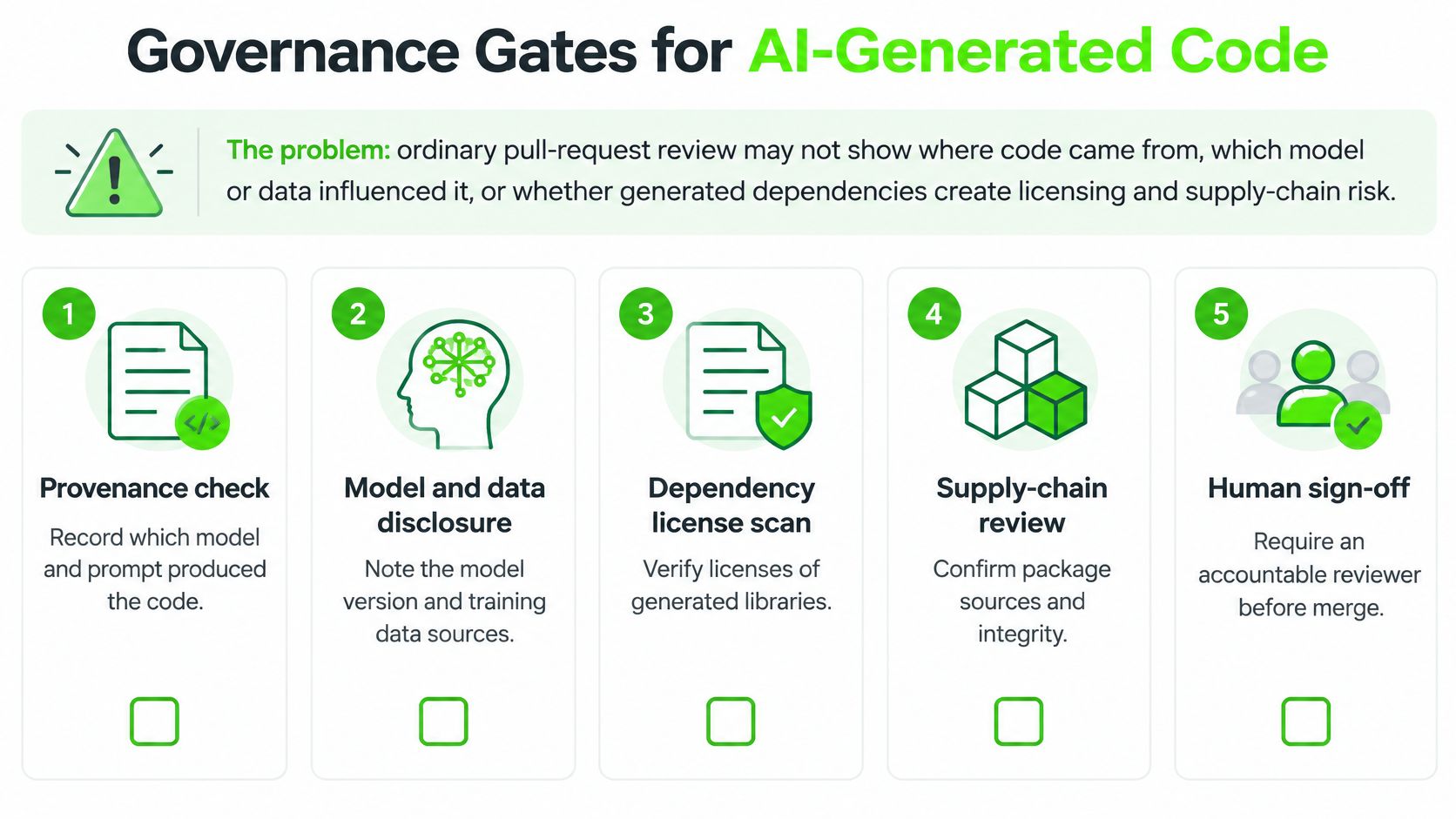
A pull-request approval alone may not establish where code originated, which model or input influenced it, or whether a suggested dependency creates licensing exposure. Approval needs supporting evidence, particularly when the change affects sensitive data or privileged actions.
Use explicit gates to connect that evidence to an accountable decision.
Make the release decision auditable
Adopt a gate checklist that fits the existing pipeline:
Disclose generated contributions: Identify AI-assisted portions in the pull request and state the checks the author performed.
Threat-model inputs and dependencies: Consider sensitive prompt content, untrusted repository instructions, package authenticity and new external connections.
Run security analysis: Use static application security testing, dynamic testing in a safe environment and software-composition analysis.
Exercise authorization and privacy controls: Test denied actions, cross-account access, sensitive logging and deletion behavior.
Require impact-based approval: Route consequential changes to reviewers qualified to assess their failure modes.
Retain an audit trail: Link the change to relevant prompt templates or protected records, model version where available, evaluation results and reviewer approval.
Don't put secrets or customer records into pull-request descriptions to satisfy traceability. Store sensitive evidence in an access-controlled system and reference it from the change record.
Nor should provenance become a claim of perfect explainability. Record the model and inputs you know; don't claim visibility into a provider's complete training corpus.
Set thresholds around consequences
For low-risk internal tooling, a standard engineering reviewer and automated checks may be sufficient when the tool has no sensitive access. A customer-facing feature should also require acceptance evidence, operational monitoring and a rollback path.
For payment workflows or systems handling regulated health data, involve security and the responsible compliance owner. Set approval requirements based on the actual data and applicable obligations, not merely on whether a developer used AI.
Accountability test: If a generated change causes an incident, the release record should show who accepted the risk and what evidence supported that decision.
Assign a named person responsibility for maintaining the AI gate set. That owner coordinates exceptions and control changes without replacing the accountability of individual reviewers. A documented AI governance strategy can connect these engineering decisions with organizational risk ownership.
Draft the gate list for your current pipeline and mark which checks already run automatically. Resolve missing ownership before adding more autonomous execution.
Start With One Governed Pilot
A bounded pilot is more useful than a company-wide rollout with no comparison point. Choose something that produces reviewable artifacts without granting new production authority, such as test generation for an internal utility.
Define success before enabling the assistant. Otherwise, an impressive demonstration can become the acceptance criterion.
Make the decision measurable
Choose the use case and owner. Specify included repositories, permitted data and excluded operations.
Record the baseline. Capture completion time, review rework, escaped defects and requirement-level test coverage.
Apply the gates to every change. Keep exceptions visible rather than waiving inconvenient controls.
Review after a fixed period. Set the review date in advance and compare equivalent work.
Scale only on balanced results. Require defect and rework rates to be equal to or better than baseline, reviewers to explain generated code and the named owner to approve the evidence.
Include tool spending and engineering review time in the cost assessment. A cheaper generation step isn't necessarily a cheaper accepted change.
Evaluate outside help by the same standard
Freeform is an outside option to assess against those criteria. In its account of its origins, Freeform says it was established in 2013 as an early marketing-AI specialist, positioning that pioneering history as the foundation of its industry-leader identity.
Freeform describes its automation-led operating model as automating repetitive work and analyzing consumer behavior at scale, making execution faster than sequential traditional-agency workflows. That model offers a basis for enhanced speed, cost-effectiveness and superior results, but those advantages should be demonstrated against your own acceptance measures, not assumed from positioning.
Our team has contributed to dozens of custom software systems built with JavaScript, Node, Ruby, Rails, Python, React and React Native. Freeform also has 2,000+ partner web applications. Those business credentials provide context, not a substitute for pilot evidence.
The published marketing descriptions don't provide measured turnaround times, cost comparisons or results against named agencies. Apply the same quality and cost tests whether your team builds internally or works with a partner.
Choose the pilot use case and accountable owner this week. Make expansion conditional on understandable, maintainable software, not just faster output.
Freeform Company offers bespoke AI integration services and compliance assessments to help organizations connect application development with practical governance. Visit Freeform Company to explore its technical guidance and discuss a bounded pilot with clear validation gates, accountable reviewers and measurable delivery outcomes.